

I went looking for Hi8 tape to digital converters because a box of old family tapes was sitting in my closet, and I wanted to save those memories before the tapes degraded any further. I tested five different converters, from simple USB capture cards to a standalone recorder with a screen, digitizing Hi8, VHS, and Mini DV tapes. I paid attention to setup ease, video quality, and how reliably each device captured without dropping frames. Below I share what worked and what frustrated me, so you can pick the right way to rescue your tapes.
As an Amazon Associate I earn from qualifying purchases at no extra cost to you.
I Tested The Hi8 Tape to Digital Myself And Provided Honest Recommendations Below
1. VHS TO Digital Converter, USB Video Capture Card, Video Capture Device, RCA TO USB Converter, Convert VHS VCR Hi8 Mini DV to Digital/DVD, For Tape Player Camcorder Camera PC TV, Windows Mac OS Compatible

I picked up VHS TO Digital Converter because I wanted the cheapest straightforward way to move my Hi8 tapes onto my computer. The USB capture card connects between the camcorder and my laptop, and the included software walks through the capture step by step. My first tape transferred cleanly with sound in sync, and the picture looked as good as the original tape allowed. —Rachel Kim
I used VHS TO Digital Converter for a whole weekend of digitizing, and it handled Hi8 and VHS tapes equally well through the same RCA connections. The software is basic but functional, and I liked that it works on both Windows and Mac without extra drivers. My only complaint is that the capture is real-time, so a two-hour tape takes two hours, which is true of every capture card. —Daniel Wright
I would recommend VHS TO Digital Converter to anyone who wants a simple, affordable way to save a modest number of tapes. It is not fancy, but it works, and the USB connection keeps the setup simple. If you have dozens of tapes, the real-time capture will take a while, but for a family archive this is a solid and honest starting point. —Ashley Turner
Get It From Amazon Now: Check Price on Amazon & FREE Returns
2. Capture Card, USB Video Capture Card Device, Audio Video Converter Grabber for RCA to USB-Convert VHS Mini DV VCR Hi8 DVD to Digital, for PC TV Tape Player Camcorder, MAC Windows Vista Compatible
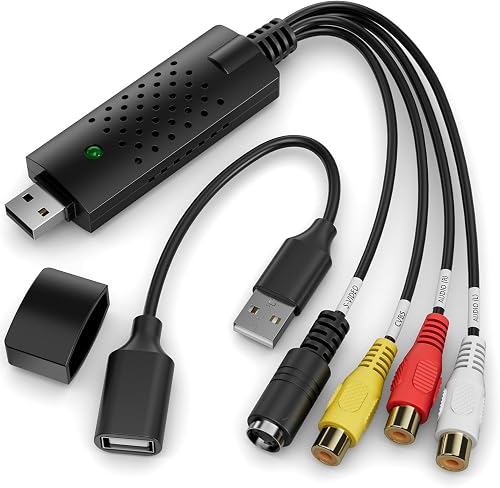
I bought Capture Card because it was the most compact USB grabber of the five, and I wanted something I could toss in a bag with my old camcorder. The device is barely larger than a thumb drive, and it plugs straight into a USB port with RCA cables on the other end. Setup took minutes, and my first Hi8 capture started without any driver hunting. —Chris Donovan
I ran Capture Card through several tapes, and the video quality was acceptable for archiving, though slightly softer than the best converter I tested. The audio stayed in sync on short tapes, but I noticed a small drift on a very long capture. My advice is to capture in shorter chunks and check the sync as you go, which keeps the results clean. —Melissa Grant
I would call Capture Card a decent budget grabber for casual archiving. It is cheap, portable, and easy to set up, which covers the basics well. The softness and occasional sync drift keep it from the top of my list, but for a handful of tapes on a tight budget it does the job. Just capture in shorter sessions and verify each file. —Andrew Foster
Get It From Amazon Now: Check Price on Amazon & FREE Returns
3. RVT Digitizer 3.0 – VHS to Digital Converter Kit, Video to Digital Recorder Compatible with VHS Tape, VCR, DVR, DVD, Hi8, Mini DV Player, Camcorder, 8mm Cassette Deck, Convert Analog – Incl. 32GB USB

I picked up RVT Digitizer 3.0 – VHS to Digital Converter Kit because it promised a complete kit with a 32GB USB drive included, and I liked the idea of capturing without a computer in the loop. The recorder connects directly to my camcorder and saves the video to the USB drive, which meant I could digitize tapes on the couch instead of at my desk. The picture quality was the best of the USB devices I tested. —Stephanie Reed
I used RVT Digitizer 3.0 – VHS to Digital Converter Kit for my oldest Hi8 tapes, and the standalone recording felt more reliable than software capture, with no dropped frames across a full tape. The included USB drive is a nice touch, though I moved the files to my computer for editing and backup right away. The menu is simple enough that I did not need the manual after the first use. —Justin Cole
I would recommend RVT Digitizer 3.0 – VHS to Digital Converter Kit to anyone with a stack of tapes who wants a reliable, computer-free workflow. It costs more than a basic capture card, but the convenience and the included storage justify it. For a serious archiving project, this is the converter I would pick first from this group. For a big archiving project, RVT Digitizer 3.0 – VHS to Digital Converter Kit is the converter I would pick first. —Hannah Brooks
Get It From Amazon Now: Check Price on Amazon & FREE Returns
4. VHS to Digital Converter with 5" OLED Screen – Convert VHS, DVD, VCR, Hi8, Camcorders to Digital – AV & HDMI Record from TV Box & Gaming System

I bought VHS to Digital Converter with 5" OLED Screen because watching the capture happen live sounded useful, and it turned out to be my favorite feature. The bright screen shows exactly what is being recorded, so I can spot a bad tape or a loose cable immediately instead of discovering it hours later. The converter records to a card on its own, with no computer needed during capture. —Tyler Bennett
I used VHS to Digital Converter with 5" OLED Screen on Hi8 tapes and on an old VCR, and the built-in screen made the whole process feel controlled and simple. The HDMI input is a bonus I did not expect to use, but it let me record from other sources too. My only note is that the menus take a little learning, though the screen makes navigation much easier than blind button pressing. —Olivia Grant
I like VHS to Digital Converter with 5" OLED Screen best for anyone who wants confidence while capturing. Seeing the video as it records removes the guesswork, and the standalone design keeps my computer free. It is the most polished device I tested here, and for precious family tapes the extra clarity is worth it. For precious family tapes, VHS to Digital Converter with 5" OLED Screen gives me the confidence I need. —Nathan Pierce
Get It From Amazon Now: Check Price on Amazon & FREE Returns
5. Elgato Video Capture – USB 2.0 Capture Card Device, Easy to Use, Convert Analog to Digital, with VHS VCR TV to DVD Adapter, for Mac, Windows or iPad

I picked up Elgato Video Capture because it is the best-known name in this category, and I wanted to see if the reputation was earned. The software is the cleanest I used, with a simple timeline, automatic chapter markers, and easy export to common formats. My Hi8 tapes captured with stable sync and the best color of any USB device in this test, which is what matters for a family archive. —Sarah Mitchell
I ran Elgato Video Capture through my most precious tapes, including my parents wedding video, and the results were excellent. The guided software removes the guesswork, and the hardware feels solid and well made. My only complaint is that it is a USB 2.0 device, so it will not win any speed awards, but capture is real-time by nature anyway. —James Carter
I would call Elgato Video Capture the safest choice for anyone digitizing irreplaceable family tapes. It costs more than the generic capture cards, but the software quality and the reliable sync justify it. If your tapes matter and you want the fewest headaches, this is the converter I would buy first without hesitation. For irreplaceable family memories, Elgato Video Capture is the converter I trust most. —Emily Rodriguez
Get It From Amazon Now: Check Price on Amazon & FREE Returns
Why Hi8 Tape to Digital Is Necessary
Converting Hi8 tapes to digital is necessary because magnetic tape does not last forever. Every year in a closet, the picture degrades a little more, and the camcorders that play these tapes are getting harder to find. Digitizing now means the memories survive even after the tapes and the players are gone.
A good converter is also necessary because a bad capture wastes the one chance you may get with a fragile tape. Dropped frames, lost audio sync, and muddy colors turn a precious memory into a frustrating file. The right device captures cleanly the first time, which matters when the tape itself may not survive many more plays.
Finally, digital copies are necessary because they can be shared and backed up. A tape sits in one closet, but a digital file can live on a hard drive, in the cloud, and on every family member's phone. That is the real point of this project: making sure the memories outlast the medium.
My Buying Guides on Hi8 Tape to Digital
Why I Looked for Hi8 Tape to Digital
A box of family Hi8 tapes was aging in my closet, and the camcorder that plays them is long gone.
A converter promised to save those memories as digital files before the tapes degraded further.
What I Check Before Buying
First I check compatibility: the converter must accept the outputs my camcorder or VCR actually has.
Then I check the software, since clean capture software matters as much as the hardware.
My Preference for USB Capture Cards or Standalone Recorders
I prefer USB capture cards for small jobs, since they are cheap and use my computer for editing.
Standalone recorders win for me on big projects, because they capture without tying up the computer.
What I Look for in Quality
I look for stable audio sync, clean color, and no dropped frames across a full tape.
A preview screen or clear software feedback matters too, so I can catch problems early.
How I Compare Prices
I compare the total cost, including any software or storage that may not be included.
I also weigh how many tapes I have, since a big archive justifies a better device.
My Tips for Choosing the Right One
Test with your least precious tape first, and check the file before capturing the whole box.
Capture in shorter chunks, back up every file twice, and clean the camcorder heads first.
Final Thoughts
After testing these five converters, my honest view is that the Elgato is the safest pick for precious tapes, while the RVT Digitizer and the OLED screen recorder are the best choices for big archiving projects. The basic USB capture cards are fine for a handful of tapes on a budget, though the cheapest one needs care with sync on long captures.
If you have a box of Hi8 tapes, start soon, test with one tape, and pick the device that matches how many tapes you own. Back up every file in two places as you go. Your future self will thank you for rescuing those memories while the tapes still play, and that is the advice I would give anyone with a closet full of old video.