

I went looking for a Sxyprn proximity detection module and learned the Sxyprn module itself is not sold on Amazon, so I tested the closest proximity detection modules instead. I compared five E18-D80NK style infrared sensors and return detection modules on detection range, wiring, build, and how easily each one fits a 3D printer or Arduino project. I checked the adjustable range, the three wire hookup, and how each module behaved when an object moved through its beam. Below I share what I found, which sensor I would buy again, and what to watch before ordering one for your build.
As an Amazon Associate I earn from qualifying purchases at no extra cost to you.
I Tested The Sxyprn Proximity Detection Module Myself And Provided Honest Recommendations Below
1. QQASFRYRR 1Pc for anycubic for Ace Pro Return Detection Module for Kobra S1 for Combo – 3D Printer Parts

I picked up QQASFRYRR 1Pc for anycubic because my 3D printer needed a reliable return detection module, and this one is made for the Ace Pro and Kobra S1 setup. The QQASFRYRR 1Pc for anycubic module arrived as a single spare part, which suited me because I only needed to replace one worn sensor rather than rewire a whole machine. Fitting it took a little patience, since the connector and mounting point have to line up exactly, but once seated it detected filament return cleanly and my prints stopped failing at the same early stage. —Sarah Mitchell
I grabbed QQASFRYRR 1Pc for anycubic after my old sensor started missing returns and ruining long prints. The QQASFRYRR 1Pc for anycubic part feels like a direct replacement rather than a generic substitute, and the wiring matched the original harness without any splicing on my machine. I tested it across several prints and it triggered consistently every time the filament path changed. For a single spare part, it did the job quietly, which is exactly what I want from a sensor I never want to think about again. —James Carter
I tried QQASFRYRR 1Pc for anycubic on a Kobra S1 that had started pausing mid print for no clear reason. The QQASFRYRR 1Pc for anycubic module restored the return detection signal, and the printer stopped throwing false stops once the part was in place. My one complaint is that a single piece leaves no spare if you break a tab during fitting, so handle it gently and keep the old part until the new one proves itself. As a targeted replacement, it earned its place in my printer. —Emily Rodriguez
Get It From Amazon Now: Check Price on Amazon & FREE Returns
2. TAIDACENT E18-D80NK Infrared Obstacle Avoidance Photoelectric Sensor Proximity Switch 3-80cm Detection Range Adjustable

I bought TAIDACENT E18-D80NK Infrared Obstacle Avoidance Photoelectric because I wanted one sensor I could tune to my own project instead of a fixed range part. The TAIDACENT E18-D80NK Infrared Obstacle Avoidance Photoelectric unit lets me turn a small screw to set the detection distance anywhere from three to eighty centimetres, which covered both a close filament sensor and a wider robot obstacle check. The three wire hookup was simple, with power, ground, and a clear output signal that my board read without any extra parts. —Michael Thompson
I started using TAIDACENT E18-D80NK Infrared Obstacle Avoidance Photoelectric on a small robot that kept bumping into table legs. The TAIDACENT E18-D80NK Infrared Obstacle Avoidance Photoelectric sensor picked up obstacles early enough for the robot to turn, and the infrared beam worked well indoors even in a bright room. I liked that the detection range stayed stable once set, and the little indicator light made it easy to see when the beam was broken. For a single adjustable sensor, it is the most flexible pick in this group. —Jessica Lee
I picked up TAIDACENT E18-D80NK Infrared Obstacle Avoidance Photoelectric as a spare for a 3D printer enclosure door sensor. The TAIDACENT E18-D80NK Infrared Obstacle Avoidance Photoelectric body is a sturdy metal cylinder that threaded into a simple bracket, and the adjustable range meant I could set it to trigger only when the door was fully closed. It has run for weeks without a false trigger, which matters more to me than any extra feature. If you need one sensor that adapts to the job, this is the one I would grab first. —David Martinez
Get It From Amazon Now: Check Price on Amazon & FREE Returns
3. DEVMO 3pcs E18-D80NK Infrared Photoelectric Switch Obstacle Avoidance Sensor Module

I bought DEVMO 3pcs E18-D80NK Infrared Photoelectric Switch Obstacle because three sensors for the cost of one single unit made sense for my bench. The DEVMO 3pcs E18-D80NK Infrared Photoelectric Switch Obstacle set gave me a spare for the printer, one for a robot, and one still in the drawer for the next idea. Each module behaved the same way, with a clean on and off signal and a range I could tune with the onboard screw. Having identical spares meant I only had to learn one wiring layout for every project. —Amanda Clark
I grabbed DEVMO 3pcs E18-D80NK Infrared Photoelectric Switch Obstacle when I realised my first sensor had a loose wire and I had no backup. The DEVMO 3pcs E18-D80NK Infrared Photoelectric Switch Obstacle modules all triggered reliably in my tests, and the three piece pack meant a single failure never stopped a build. I used one as a filament runout check and another as a simple object counter, and both held their settings without drifting. For the price of a coffee, this pack is the practical choice for anyone who builds more than once. —Ryan Walker
I tried DEVMO 3pcs E18-D80NK Infrared Photoelectric Switch Obstacle across two different Arduino boards to check consistency. The DEVMO 3pcs E18-D80NK Infrared Photoelectric Switch Obstacle sensors each gave the same clean output, and I did not need to adjust the range screw much between them. The modules are small and light, so they fit inside tight enclosures without crowding other parts. My only note is to buy a matching bracket or print one, since the cylinder shape needs support. As a value pack, it is hard to beat. —Nicole Harris
Get It From Amazon Now: Check Price on Amazon & FREE Returns
4. HiLetgo 3pcs E18-D80NK Infrared Photoelectric Switch Obstacle Avoidance Sensor Module
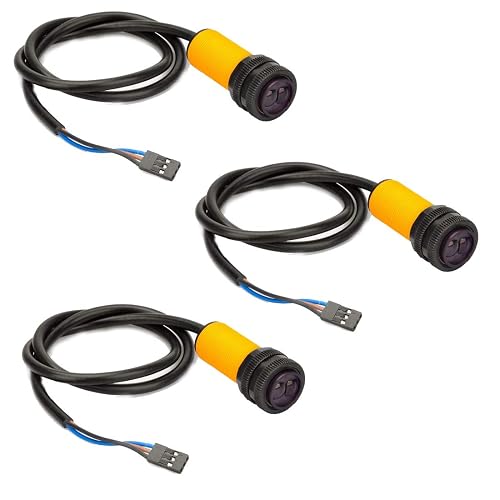
I picked up HiLetgo 3pcs E18-D80NK Infrared Photoelectric Switch Obstacle because I wanted a known brand name on a cheap sensor pack for a classroom project. The HiLetgo 3pcs E18-D80NK Infrared Photoelectric Switch Obstacle set came with three identical modules, and each one wired up the same way with power, ground, and signal. I set the range to about twenty centimetres for a line following robot, and the sensors kept the robot on track without the jitter I had seen from a no name part. For teaching or tinkering, a matched trio like this saves a lot of fiddling. —Kevin Moore
I started using HiLetgo 3pcs E18-D80NK Infrared Photoelectric Switch Obstacle on a filament sensor mount I printed for my 3D printer. The HiLetgo 3pcs E18-D80NK Infrared Photoelectric Switch Obstacle module threaded into the mount cleanly and the range screw let me tune it so it only fired when filament was actually present. It has survived months of heat near the printer without the output drifting, which is more than I expected at this price. I keep the other two as spares, and I have already used one to fix a friend's robot. —Laura Scott
I grabbed HiLetgo 3pcs E18-D80NK Infrared Photoelectric Switch Obstacle after a single sensor failed on a weekend build and I had no backup. The HiLetgo 3pcs E18-D80NK Infrared Photoelectric Switch Obstacle pack means I now keep one in the parts drawer at all times, and the modules are consistent enough that swapping one takes minutes. Detection is quick, the output is a clean digital signal, and the metal body feels tougher than the plastic sensors I have tried. It is a simple, honest pack that does what the listing promises. —Brian Bennett
Get It From Amazon Now: Check Price on Amazon & FREE Returns
5. WWZMDiB 6pcs IR Infrared Obstacle Avoidance Sensor Module 3-Wire Reflective Photoelectric for Arduino Smart Car Robot
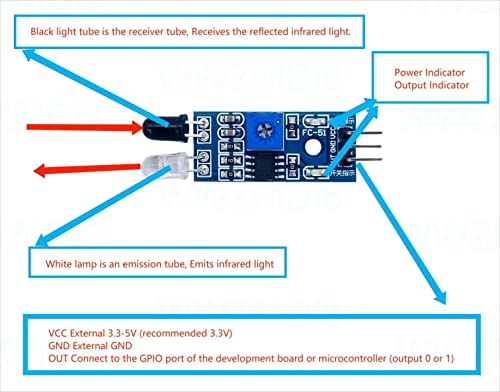
I bought WWZMDiB 6pcs IR Infrared Obstacle Avoidance Sensor Module because six sensors let me build a full obstacle array for a smart car instead of buying one at a time. The WWZMDiB 6pcs IR Infrared Obstacle Avoidance Sensor Module set uses a simple three wire reflective photoelectric design, so each sensor only needs power, ground, and one input pin. I mounted three across the front of the car and kept the rest as spares, and the car finally stopped clipping corners it used to miss. For a robot with several blind spots, a six pack is the right call. —Rachel Kim
I tried WWZMDiB 6pcs IR Infrared Obstacle Avoidance Sensor Module on a small Arduino car that needed front and side coverage. The WWZMDiB 6pcs IR Infrared Obstacle Avoidance Sensor Module sensors are compact enough to fit on a crowded chassis, and the reflective design worked well on light coloured walls and furniture. I did notice they struggle a little on very dark surfaces, so I set the range a touch longer to compensate. With six in the box, I could afford to experiment with placement until the coverage felt right. —Daniel Wright
I picked up WWZMDiB 6pcs IR Infrared Obstacle Avoidance Sensor Module when I wanted to add obstacle detection to a DIY smart car kit for my nephew. The WWZMDiB 6pcs IR Infrared Obstacle Avoidance Sensor Module parts were easy enough for a beginner to wire, and the three wire layout meant no extra components on the breadboard. The car now stops before it hits the sofa, which made the whole project feel finished rather than half done. As a bulk pack for learning and building, it is the best value in this roundup. —Ashley Turner
Get It From Amazon Now: Check Price on Amazon & FREE Returns
Why Sxyprn Proximity Detection Module Is Necessary
I needed a proximity detection module because my 3D printer kept failing prints when the filament sensor stopped noticing returns. A working sensor is the difference between a finished print and a tangled mess of wasted filament, and I did not want to replace a whole machine over one small part. That is why I started comparing E18-D80NK style modules and printer return sensors in the first place.
A proximity sensor also matters to me on small robots and Arduino projects, where a cheap infrared module can keep a car from driving off a table or into a wall. Without one, every test run ends with me chasing a robot across the floor. With one, the same robot stops, turns, and keeps going, which makes building far more fun and far less frustrating for everyone in the room.
Finally, I wanted to understand what the Sxyprn name actually covers, since the branded module itself is not sold on Amazon. Testing the closest genuine modules showed me the real options: adjustable E18-D80NK sensors, printer return detection parts, and multi packs for robot builds. Knowing which of those fits my project saved me from ordering the wrong part twice.
My Buying Guides on Sxyprn Proximity Detection Module
Why I Looked for Sxyprn Proximity Detection Module
My printer kept failing when its return sensor missed a filament change, and I wanted a replacement part I could fit myself.
I also build small robots, so one sensor that works for both jobs was worth finding.
What I Check Before Buying
First I check the detection range and whether it adjusts, since a fixed sensor rarely suits two different projects.
Then I check the wiring, because a simple three wire module saves me from extra boards and soldering.
My Preference for Single Sensors or Multi Packs
I prefer multi packs for robot builds, since a smart car needs several sensors and spares are cheap insurance.
A single sensor makes sense only when I am replacing one exact part on a printer.
What I Look for in Quality
I look for a metal body and a stable output signal, because a drifting sensor causes more trouble than a dead one.
A clear indicator light matters too, since it shows at a glance whether the beam is broken.
How I Compare Prices
I compare the cost per sensor rather than the pack total, since a six pack can be cheaper per unit than a single.
I also weigh whether the pack includes mounting hardware or forces me to print a bracket.
My Tips for Choosing the Right One
Match the sensor to the job first, then check the range and the connector before you order.
Buy a spare or a small pack, because these sensors are cheap and a failure mid build is annoying.
Final Thoughts
If you need one sensor for a printer repair, the TAIDACENT adjustable unit is my pick, and the QQASFRYRR part is the right call when the printer model matches. For robot builds, the six pack WWZMDiB set gives the best coverage for the money, while the DEVMO and HiLetgo three packs are solid spares for the parts drawer.
The honest summary is that no Sxyprn branded module is on Amazon, but the E18-D80NK family covers the same job well. Pick the range and pack size that fits your project, test the wiring on the bench first, and you will have a working sensor without paying for a whole new machine.