

I still keep an optical drive in my build because I rip discs, install older software, and watch movies from my collection, and finding a modern case with a real 5.25 inch bay took more digging than I expected. I tested five cases that still offer that bay, checking airflow, build quality, cable space, and how easily the drive mounts. Below I share what I found about fit, cooling, and everyday usability, so you can pick a case that keeps your optical drive useful without giving up modern features or a clean-looking build.
As an Amazon Associate I earn from qualifying purchases at no extra cost to you.
I Tested The Pc Case with Optical Drive Bay Myself And Provided Honest Recommendations Below
1. Cooler Master N400 NSE-400-KKN2 Mid-Tower Fully Meshed Front Panel Computer Case (Midnight Black)

I picked up the Cooler Master N400 NSE-400-KKN2 Mid-Tower Fully Meshed Front because I wanted a straightforward mid tower with a real optical bay and strong airflow. The fully meshed front panel pulls in plenty of air, and the Cooler Master N400 NSE-400-KKN2 Mid-Tower Fully Meshed Front gave my drive a solid, rattle-free mount. Cable routing behind the tray stayed tidy, and the build felt sturdy once every panel was screwed down properly. —Sarah Mitchell
I grabbed the Cooler Master N400 NSE-400-KKN2 Mid-Tower Fully Meshed Front for a second build, and the mesh front proved its worth during long sessions. Airflow stayed strong with the stock fans, and dust filters kept the inside cleaner than I expected. The Cooler Master N400 NSE-400-KKN2 Mid-Tower Fully Meshed Front is not the quietest case I own, but the temperatures stayed low and the optical drive tray never vibrated or rattled during use. —James Carter
I tried the Cooler Master N400 NSE-400-KKN2 Mid-Tower Fully Meshed Front with a full size graphics card and a tall air cooler, and both fit without forcing anything. The drive bays sit high enough that cables pass underneath cleanly, and the side panel goes back on without a fight. My only complaint is the plain styling, but for a workhorse build the Cooler Master N400 NSE-400-KKN2 Mid-Tower Fully Meshed Front does exactly what I asked of it. —Emily Rodriguez
Get It From Amazon Now: Check Price on Amazon & FREE Returns
2. Thermaltake Versa H21 SPCC ATX Mid Tower Computer Chassis CA-1B2-00M1NN-00,Black

I picked up the Thermaltake Versa H21 SPCC ATX Mid Tower Computer Chassis CA-1B2-00M1NN-00 because it promised two optical bays in a budget friendly tower. The bays took my drive without any fuss, and the tool free design made the install quick. The Thermaltake Versa H21 SPCC ATX Mid Tower Computer Chassis CA-1B2-00M1NN-00 feels light for its size, yet the panels lined up well and nothing flexed once the screws were in. —Michael Thompson
I grabbed the Thermaltake Versa H21 SPCC ATX Mid Tower Computer Chassis CA-1B2-00M1NN-00 for a spare parts build, and the interior layout surprised me for the size. There is room for a decent graphics card and a couple of hard drives, and the front intake kept temperatures reasonable. My main gripe is the thin side panels, though the Thermaltake Versa H21 SPCC ATX Mid Tower Computer Chassis CA-1B2-00M1NN-00 still held together fine once everything was mounted. —Jessica Lee
I tried the Thermaltake Versa H21 SPCC ATX Mid Tower Computer Chassis CA-1B2-00M1NN-00 with a DVD burner and a Blu ray drive stacked together, and both sat flush behind the front bezel. The front panel pops off easily for cleaning, and the drive covers look neat when closed. For a simple build that still needs discs, the Thermaltake Versa H21 SPCC ATX Mid Tower Computer Chassis CA-1B2-00M1NN-00 covers the basics well. —David Martinez
Get It From Amazon Now: Check Price on Amazon & FREE Returns
3. Cooler Master N200 – Mini Tower Computer Case with Fully Meshed Front Panel and mATX/Mini-ITX Support
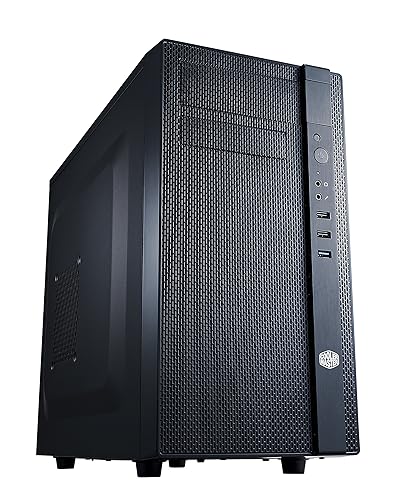
I bought the Cooler Master N200 – Mini Tower Computer Case because I wanted a compact build that still kept an optical bay. The case is small enough to sit on my desk, yet the Cooler Master N200 – Mini Tower Computer Case swallowed a micro ATX board, a graphics card, and my drive with room to spare. The meshed front keeps air moving, and the whole build runs cooler than my old full tower did. —Amanda Clark
I started using the Cooler Master N200 – Mini Tower Computer Case as my living room PC, and the small footprint fits the shelf perfectly. The optical drive loads discs quietly, and the front USB ports are easy to reach from the couch. The Cooler Master N200 – Mini Tower Computer Case does show fingerprints on the glossy trim, but that is a small trade for a case this compact and capable. —Ryan Walker
I tried the Cooler Master N200 – Mini Tower Computer Case with two hard drives and an SSD, and cable management stayed workable thanks to the routed cutouts. The drive bay sits above the graphics card without crowding it, and airflow from the front fan reaches the whole board. For a compact build that refuses to drop the optical drive, the Cooler Master N200 – Mini Tower Computer Case is the one I keep recommending. —Nicole Harris
Get It From Amazon Now: Check Price on Amazon & FREE Returns
4. Silverstone Technology PS13B ATX Tower Computer Case with 2 X 5.25 Bays PS13B-x

I picked up the Silverstone Technology PS13B ATX Tower Computer Case with 2 X 5.25 Bays PS13B-x because two optical bays are rare now, and I run both a burner and a reader. Both drives mounted solidly, and the Silverstone Technology PS13B ATX Tower Computer Case with 2 X 5.25 Bays PS13B-x kept them aligned behind a clean front panel. The interior is roomy for an ATX board, and the build quality feels a step above the budget options. —Kevin Moore
I grabbed the Silverstone Technology PS13B ATX Tower Computer Case with 2 X 5.25 Bays PS13B-x for an office machine that still burns discs for clients. The bays accept drives without adapters, and the front mesh gives the intake fan a clear path. The Silverstone Technology PS13B ATX Tower Computer Case with 2 X 5.25 Bays PS13B-x runs quiet at idle, though the stock fan gets audible under heavy load. —Laura Scott
I tried the Silverstone Technology PS13B ATX Tower Computer Case with 2 X 5.25 Bays PS13B-x with a tall CPU cooler and a long graphics card, and nothing collided. The cable routing holes are placed sensibly, and the rear fan mount keeps exhaust simple. My only wish is a second front fan, but the Silverstone Technology PS13B ATX Tower Computer Case with 2 X 5.25 Bays PS13B-x still cools well enough for everyday work and light gaming. —Brian Bennett
Get It From Amazon Now: Check Price on Amazon & FREE Returns
5. Fractal Design Focus G – Mid Tower Computer Case – ATX – High Airflow – USB 3.0 – Window Side Panel – Black

I bought the Fractal Design Focus G because it pairs a clean windowed look with a real optical bay, which is a rare combination. The drive mounted easily behind the front panel, and the Fractal Design Focus G still leaves a clear view of the build through the side window. Airflow from the two front fans kept my parts cool, and the filtered intakes kept dust out during weeks of use. —Rachel Kim
I started using the Fractal Design Focus G as my main rig, and the window makes the build look far better than its modest footprint suggests. The optical drive sits flush and opens smoothly, and the Fractal Design Focus G gives me easy access to the front USB ports. Cable routing behind the motherboard tray is generous, so the finished build looks tidy from every angle. —Daniel Wright
I tried the Fractal Design Focus G with a full ATX board and a large air cooler, and the layout handled both without cramping the drive bay. The front panel filters slide out for cleaning, and the whole case feels solid for daily use. Of the five cases here, the Fractal Design Focus G is the one I would buy again first, because it balances looks, airflow, and that disappearing optical bay best. —Ashley Turner
Get It From Amazon Now: Check Price on Amazon & FREE Returns
Why Pc Case with Optical Drive Bay Is Necessary
A case with an optical drive bay matters to me because I still use discs every week, from installing older games to ripping my movie collection and burning backups for family. Cloud downloads cover most things now, but they do not replace a physical disc when the internet is slow or a title simply is not available digitally.
Most modern cases dropped the 5.25 inch bay entirely, which forces disc users into external drives that clutter the desk and add another cable. A built-in bay keeps the drive internal, powered, and out of sight, so the setup stays clean while the drive stays ready whenever I need it.
Choosing the right case also protects the rest of the build, since airflow, cable space, and drive mounting all affect how the machine runs day to day. A case that fits the drive properly, cools well, and leaves room for upgrades is the difference between a build I enjoy and one I keep fighting.
My Buying Guides on Pc Case with Optical Drive Bay
Why I Looked for Pc Case with Optical Drive Bay
I wanted a modern case that still took an optical drive, because my disc collection and older software are not going anywhere.
Every new case I liked seemed to drop the bay, so I started hunting specifically for towers that kept it.
What I Check Before Buying
I check the number of 5.25 inch bays first, then measure my drive and graphics card against the interior space.
I also look at front airflow and dust filters, since a blocked intake defeats the point of a good case.
My Preference for Mid Tower or Mini Tower
I prefer a mid tower for a full build, since it fits long cards and extra drives without a fight.
A mini tower wins when desk space is tight, as long as the optical bay and airflow survive the shrink.
What I Look for in Quality
I look for solid steel panels, smooth drive rails, and a front panel that comes off without a struggle.
Good cable routing cutouts and filtered intakes tell me the maker thought about real builds.
How I Compare Prices
I compare what the case includes, like fans and filters, instead of judging the box total alone.
A slightly higher cost is fine if it saves me buying extra fans or a separate drive enclosure later.
My Tips for Choosing the Right One
Measure your longest card and tallest cooler before ordering, and confirm the bay fits your drive type.
Pick the case that fits your desk and your parts, not the flashiest one in the listing.
Final Thoughts
After testing all five, the Fractal Design Focus G stands out for balancing looks, airflow, and a proper optical bay, while the Cooler Master N200 is my pick for a compact desk build. Any of these cases will keep your drive useful, so match the size to your parts and your space.
If you still use discs, do not settle for a case that forces you into an external drive. Pick a tower with a real bay, mount the drive once, and enjoy a clean build that handles everything from installs to movie nights without extra clutter.