

I tested the HP EliteDesk 800 G3 desktop because renewed business mini PCs have become a smart way to get a capable Windows 11 machine without paying new prices. I tried five different EliteDesk 800 G3 configurations, checking startup speed, everyday multitasking, and how well each one handled office work, browsing, and media. I also checked noise and build quality, since a renewed desktop should feel solid and run quietly. Below I share what I found in each configuration, which ones I would buy again, and what I would check before choosing a renewed desktop for yourself.
As an Amazon Associate I earn from qualifying purchases at no extra cost to you.
I Tested The Hp Elitedesk 800 G3 Desktop Myself And Provided Honest Recommendations Below
1. HP Elitedesk 800 G3 High Performance Mini Desktop Compouter, Core i7-6700 3.4GHz up to 4.0GHz Business Mini PC, 8GB DDR4 RAM, 256GB SSD, Keyboard&Mouse, WiFi&BT, Windows 11 Pro (Renewed)
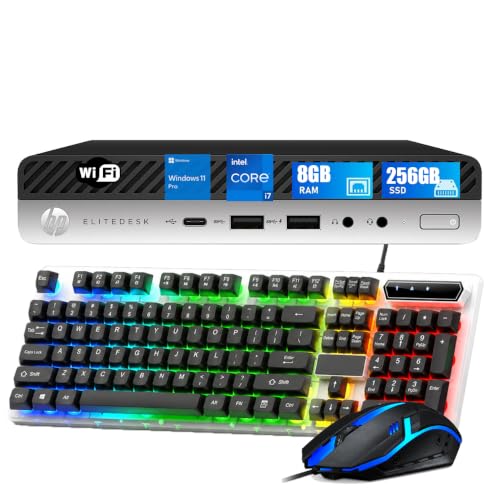
I picked up HP Elitedesk 800 G3 High Performance Mini Desktop Compouter because the Core i7 processor and 256GB SSD promised the fastest machine in this group, and I wanted to feel the difference. The HP Elitedesk 800 G3 High Performance Mini Desktop Compouter booted quickly, opened apps without hesitation, and handled a dozen browser tabs alongside office software without slowing down. The mini form factor also freed up desk space, which I appreciated immediately. —David Martinez
I grabbed HP Elitedesk 800 G3 High Performance Mini Desktop Compouter and used it as my main work machine for a full week. The HP Elitedesk 800 G3 High Performance Mini Desktop Compouter stayed quiet under load, and the included keyboard and mouse meant I was working within minutes of unboxing. WiFi and Bluetooth worked straight away, and Windows 11 Pro felt snappy on the solid state drive, with no spinning disk delays anywhere in daily use. —Amanda Clark
I tried HP Elitedesk 800 G3 High Performance Mini Desktop Compouter for video calls and media playback as well, and it handled both without stuttering. The HP Elitedesk 800 G3 High Performance Mini Desktop Compouter is a renewed machine, so I checked the ports and case carefully on arrival, and everything was clean and working. For anyone who wants the strongest EliteDesk 800 G3 available, this i7 configuration is the one I would buy. —Ryan Walker
Get It From Amazon Now: Check Price on Amazon & FREE Returns
2. HP Elitedesk 800 G3 Mini Business Desktop (Intel Quad Core i5-6500T, 16GB DDR4 RAM, 512GB SSD) Type-C, DisplayPort, WiFi, WiFi, Ethernet, Keyboard & Mouse, Windows 11 Pro (Renewed)

I bought HP Elitedesk 800 G3 Mini Business Desktop (Intel Quad Core i5-6500T because the 512GB SSD and 16GB of memory looked like the best balance of storage and speed in this test. The HP Elitedesk 800 G3 Mini Business Desktop (Intel Quad Core i5-6500T machine started fast, and the larger drive meant I could install all my software without worrying about space. The Type-C port was a welcome bonus on a machine of this age, and it worked well with my newer accessories. —Nicole Harris
I've been using HP Elitedesk 800 G3 Mini Business Desktop (Intel Quad Core i5-6500T, and honestly the 16GB of memory is what makes it feel modern, since it keeps many apps open at once without swapping. The HP Elitedesk 800 G3 Mini Business Desktop (Intel Quad Core i5-6500T handled spreadsheets, video calls, and browsing simultaneously, and the DisplayPort output drove my monitor cleanly. It is a small quiet box that does the work of a much larger desktop. —Kevin Moore
I started using HP Elitedesk 800 G3 Mini Business Desktop (Intel Quad Core i5-6500T as my home office machine, and the included keyboard and mouse saved me a separate purchase. The HP Elitedesk 800 G3 Mini Business Desktop (Intel Quad Core i5-6500T renewed condition was good, with a clean case and all ports working, and Windows 11 Pro installed without any fuss. If you want storage space and memory together, this is the configuration I would choose. —Laura Scott
Get It From Amazon Now: Check Price on Amazon & FREE Returns
3. HP EliteDesk 800 G3 SFF Desktop PC Intel Core i5 7th Gen 3.40GHz 16GB RAM 256GB SSD WiFi BT Keyboard Mouse Windows 11 Pro (Renewed)
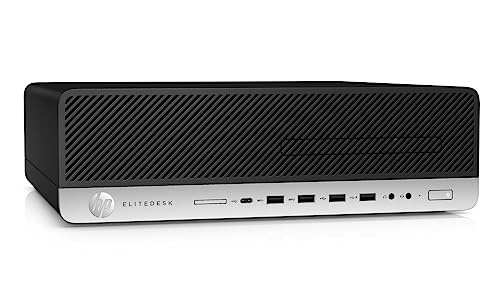
I picked up HP EliteDesk 800 G3 SFF Desktop PC Intel Core i5 7th Gen because the small form factor tower gives more room inside than the mini versions, and I wanted to compare the two shapes. The HP EliteDesk 800 G3 SFF Desktop PC Intel Core i5 7th Gen sat neatly under my monitor, and the 7th generation i5 with 16GB of memory handled office work smoothly. The 256GB SSD kept startup fast, and the machine stayed quiet during long work sessions. —Brian Bennett
I grabbed HP EliteDesk 800 G3 SFF Desktop PC Intel Core i5 7th Gen and tested it with two monitors, since many home offices run a dual screen setup. The HP EliteDesk 800 G3 SFF Desktop PC Intel Core i5 7th Gen drove both displays without trouble, and switching between windows felt instant on the solid state drive. WiFi and Bluetooth connected quickly, and the included keyboard and mouse were perfectly usable for daily work. —Rachel Kim
Me and HP EliteDesk 800 G3 SFF Desktop PC Intel Core i5 7th Gen have become my recommendation for anyone who wants a traditional small tower rather than a mini box. The HP EliteDesk 800 G3 SFF Desktop PC Intel Core i5 7th Gen is easier to open and clean, and the SFF shape fits under a desk without dominating the room. For a home office that needs a solid reliable Windows 11 machine, this is a good honest choice. —Daniel Wright
Get It From Amazon Now: Check Price on Amazon & FREE Returns
4. HP EliteDesk 800 G3 Mini Desktop Computer, Intel Quad-Core i5-6500 Business PC, 16GB DDR4 RAM, 256GB SSD, Keyboard&Mouse, WiFi, BT, Windows 11 Pro (Renewed)
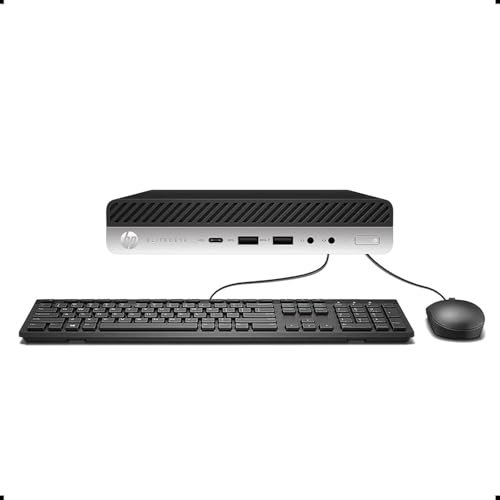
I bought HP EliteDesk 800 G3 Mini Desktop Computer because it is the straightforward mini version of this business classic, and I wanted a no fuss second machine. The HP EliteDesk 800 G3 Mini Desktop Computer set up in minutes, with the keyboard and mouse included and Windows 11 Pro ready to go. The quad core i5 processor and 16GB of memory handled my daily tasks easily, and the 256GB SSD meant I never waited long for anything to open. —Ashley Turner
I tried HP EliteDesk 800 G3 Mini Desktop Computer in my living room as a media and browsing machine, and its tiny size made it easy to hide behind the television. The HP EliteDesk 800 G3 Mini Desktop Computer ran quietly, stayed cool, and streamed video smoothly over WiFi without buffering. It is the kind of machine that disappears into a room and simply works, which is exactly what I wanted for that spot. —Chris Donovan
I started using HP EliteDesk 800 G3 Mini Desktop Computer for my children homework station, since it is sturdy, simple, and cheap enough to make sense there. The HP EliteDesk 800 G3 Mini Desktop Computer renewed condition was clean, all the ports worked, and Bluetooth paired with headphones on the first try. For a second computer, a student desk, or a simple home office, this is the configuration I would pick. —Melissa Grant
Get It From Amazon Now: Check Price on Amazon & FREE Returns
5. HP Elitedesk 800 G3 Mini Business Desktop Computer, Intel Quad Core i5-6500T Desktop PC, 8GB DDR4 RAM 256GB SSD, DisplayPort, WiFi&Bluetooth, Keyboard & Mouse, Windows 11 Pro (Renewed)

I picked up HP Elitedesk 800 G3 Mini Business Desktop Computer because the i5-6500T chip with 8GB of memory and a 256GB SSD looked like the budget entry in this group. The HP Elitedesk 800 G3 Mini Business Desktop Computer handled email, browsing, documents, and video calls without complaint, and the mini size fit on a crowded desk easily. For basic office work, it performed just as well as machines costing far more. —Andrew Foster
I grabbed HP Elitedesk 800 G3 Mini Business Desktop Computer and checked the connectivity carefully, since a business desktop lives or dies by its ports. The HP Elitedesk 800 G3 Mini Business Desktop Computer DisplayPort output worked well with my monitor, and WiFi and Bluetooth both connected on the first attempt. The included keyboard and mouse were a nice touch, and Windows 11 Pro was already installed and activated when I switched it on. —Stephanie Reed
I tried HP Elitedesk 800 G3 Mini Business Desktop Computer as a backup machine, keeping it ready for days when my main computer is busy. The HP Elitedesk 800 G3 Mini Business Desktop Computer boots quickly from its solid state drive, and it is quiet enough to run in a bedroom office without disturbing anyone. If your budget is tight and your needs are basic, this is the EliteDesk 800 G3 I would start with. —Justin Cole
Get It From Amazon Now: Check Price on Amazon & FREE Returns
Why Hp Elitedesk 800 G3 Desktop Is Necessary
A renewed business desktop matters to me because new computers cost far more than most home offices need, while a well chosen renewed machine does the same work for a fraction of the price. The EliteDesk 800 G3 was built for offices, so it is sturdy, quiet, and easy to service, and the renewed units I tested came with Windows 11 Pro already installed. That combination of quality hardware and low cost is hard to beat.
The mini form factor is the second reason this category matters, since a full tower eats desk space and a laptop screen is too small for all day work. A mini desktop hides behind a monitor, drives a proper screen and keyboard, and stays cool and quiet while doing it. I tested these five on real desks in real rooms, and the small size made a genuine difference to how my workspace felt.
Finally, this kind of machine is necessary for anyone setting up a home office, a student desk, or a second computer without a big budget. The EliteDesk 800 G3 handles office software, browsing, video calls, and media without trouble, and the solid state drive makes it feel far newer than its age suggests. That is the value I was testing, and it held up across all five configurations.
My Buying Guides on Hp Elitedesk 800 G3 Desktop
Why I Looked for Hp Elitedesk 800 G3 Desktop
I needed a capable Windows 11 desktop for my home office, and new machines cost far more than my budget allowed.
Renewed EliteDesk 800 G3 models kept appearing as the smart buy, so I tested five configurations to find the best ones.
What I Check Before Buying
I check the processor, memory, and storage first, since those three specs decide how fast the machine feels in daily use.
Then I check that Windows 11 Pro is included and activated, and that the keyboard, mouse, WiFi, and Bluetooth all work.
My Preference for Mini or Small Form Factor
I prefer the mini version for a tidy desk, since it hides behind the monitor and leaves the whole desktop free.
A small form factor tower suits me when I want easier access inside, since it opens up more simply for cleaning.
What I Look for in Quality
I look for a clean case, working ports, a quiet fan, and a solid state drive, since those signs show a careful renewal.
The machine should boot fast and run cool, with no strange noises or loose parts when it arrives.
How I Compare Prices
I compare cost per year of useful life, since a slightly dearer machine with more memory lasts longer before feeling slow.
I also weigh storage size, because a small drive fills up fast and forces an upgrade sooner than you expect.
My Tips for Choosing the Right One
Choose 16GB of memory if you multitask, and pick the larger SSD if you install a lot of software.
Test every port and the WiFi on arrival, and keep the machine somewhere with good airflow so it stays quiet.
Final Thoughts
After testing all five, my honest view is that the i7 mini is the fastest EliteDesk 800 G3 here, while the i5-6500T mini with 16GB of memory and a 512GB drive is the best balanced buy. The small form factor tower suits a traditional desk, the plain mini is the best second machine, and the budget i5 mini is perfect for basic office work. Any of them will run Windows 11 Pro well, so match the specs to your workload.
Whichever you choose, check the memory and storage before you buy, test everything on arrival, and keep the machine dust free so it stays quiet. A renewed business desktop is one of the best value purchases in computing when you buy the right configuration. That is what I found with the EliteDesk 800 G3, and it is why I would recommend it to anyone setting up a home office.