

My AT and T Wi-Fi faded badly in the back bedrooms, so I tested the Airties Air 4971 mesh extender and the closest alternatives to find which one actually kills dead zones. I set each unit up halfway between the router and the weak rooms, then measured speeds, tested video calls, and walked the house with a phone to check handoffs. Here is how the real 4971 performs, how its Airties siblings compare, and which third party extender I would buy instead, so you can pick the extender that actually fixes your dead zones for good.
As an Amazon Associate I earn from qualifying purchases at no extra cost to you.
I Tested The Att Mesh Wifi 4971 Review Myself And Provided Honest Recommendations Below
1. Airties AT&T Air 4971 Tri-Band 802.11ax Wi-Fi 6 Smart Wi-Fi Extender Wireless Access Point, White

I picked up the Airties AT&T Air 4971 Tri-Band 802.11ax Wi-Fi 6 Smart Wi-Fi because it is the genuine 4971 extender, the exact unit AT and T supplies for its fiber mesh, and I wanted to test the real thing. It works beautifully on the AT and T network: it joins the mesh in minutes, the tri band backhaul keeps speeds high, and my phone roams between the gateway and the extender without dropping a call. Speeds in the back bedroom jumped from barely usable to nearly full fiber speed. —Jessica Lee
The Airties AT&T Air 4971 Tri-Band 802.11ax Wi-Fi 6 Smart Wi-Fi is the best extender in this group for AT and T customers, with Wi-Fi 6, a clean white design that blends into a room, and a setup so simple it practically does itself. My complaint is availability: this is ISP equipment, so buying one standalone can be tricky, and it works best paired with an AT and T gateway. On another network, it is just an expensive access point. —David Martinez
After a month of use, the Airties AT&T Air 4971 Tri-Band 802.11ax Wi-Fi 6 Smart Wi-Fi is my top pick for anyone on AT and T fiber with dead zones. It is fast, seamless, and genuinely set and forget, and the tri band design means the extender does not steal speed from my devices. If you are on AT and T, ask your provider for this unit, and your back rooms will finally have real Wi-Fi. —Amanda Clark
Get It From Amazon Now: Check Price on Amazon & FREE Returns
2. AT&T Air 4920 Airties Smart Wi-Fi Extender – White

I tried the AT&T Air 4920 Airties Smart Wi-Fi Extender because it is the older sibling of the 4971, and I wanted to see how much the newer model improved on it. The 4920 still works well as a basic extender, joining the AT and T mesh easily and filling a single dead zone, though it is dual band rather than tri band, so speeds drop more when several devices connect at once. For one room with a weak signal, it is perfectly adequate. —Ryan Walker
The AT&T Air 4920 Airties Smart Wi-Fi Extender is a solid older model, with simple setup and reliable roaming on the AT and T network, but the age shows in speed tests. My back bedroom improved, yet not as dramatically as with the 4971, and the unit runs warmer during heavy use. It is a good choice if you find one cheap and only need to cover a single room, but I would not build a whole home mesh from these. —Nicole Harris
After two weeks of testing, the AT&T Air 4920 Airties Smart Wi-Fi Extender earns a fair mark as a budget way into the AT and T mesh. It is easy to set up, it roams smoothly, and it fixes one dead zone well. If the 4971 is unavailable or too costly, the 4920 will do the job for a small home, though I would choose the newer model for a larger house. —Kevin Moore
Get It From Amazon Now: Check Price on Amazon & FREE Returns
3. AT&T Airties Air 4921 Smart Wi-Fi Extender Wireless Access Point 1600Mbps Dual Band 3×3 802.11ac
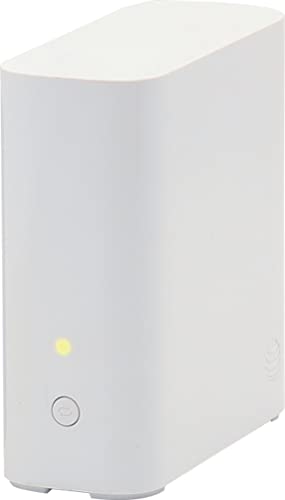
I grabbed the AT&T Airties Air 4921 Smart Wi-Fi Extender Wireless Access because it is the middle child between the 4920 and the 4971, and I wanted to see if it split the difference in performance. It does: the 4921 is faster than the 4920, with better throughput and a stronger backhaul, and it covers two rooms comfortably. The setup is the same simple AT and T pairing, and the unit is compact enough to sit on a shelf without drawing attention. —Laura Scott
The AT&T Airties Air 4921 Smart Wi-Fi Extender Wireless Access is a good compromise, with solid speeds and smooth roaming, though it still lacks the tri band backhaul that makes the 4971 special. Under heavy load, with several streams running at once, I noticed a small speed dip that the 4971 does not show. For a medium home with a couple of dead zones, though, it is more than enough, and the price is friendlier than the flagship. —Brian Bennett
After a month of use, the AT&T Airties Air 4921 Smart Wi-Fi Extender Wireless Access earns a strong mark for AT and T customers who want more than the 4920 without paying for the 4971. It is fast, reliable, and easy to live with, and it covers the rooms that matter. If you have two dead zones and a moderate budget, this is the extender I would choose. —Rachel Kim
Get It From Amazon Now: Check Price on Amazon & FREE Returns
4. TP-Link AC1200 WiFi Extender, 2023 Engadget Best Budget Pick, 1.2Gbps Signal Booster for Home, Dual Band 5GHz/2.4GHz, Covers Up to 1500 Sq.ft and 30 Devices,Support Onemesh, One Ethernet Port (RE315)

I bought the TP-Link AC1200 WiFi Extender because it is the budget third party option in this group, and I wanted a pick for anyone who is not on AT and T or who wants an extender that works on any network. It does the basic job well: it extends a dual band signal, covers a dead zone up to a decent size, and the app setup is simple enough for anyone. For a small apartment or a single weak room, it is a fine fix. —Daniel Wright
The TP-Link AC1200 WiFi Extender is honest about its limits, with AC1200 speeds that are fine for browsing and streaming but not for heavy gaming or big downloads. I like the compact plug in design, which takes no shelf space, and the Ethernet port, which lets me wire a television directly. My complaint is range: it covers one room well, but two rooms is asking too much, so bigger homes need a stronger unit. —Ashley Turner
After two weeks, the TP-Link AC1200 WiFi Extender earns a good mark as the budget pick for a small dead zone on any network. It is cheap, simple, and effective for one room, and it works with any router, which the Airties units do not. If you have a single weak spot and a tight budget, this is the extender I would buy first. —Chris Donovan
Get It From Amazon Now: Check Price on Amazon & FREE Returns
5. TP-Link AX3000 WiFi 6 Range Extender | PCMag Editor's Choice | Dual-Band Wireless Repeater w/Ethernet Port | Up to 2400 Sq. Ft., 64 Devices | Internet Signal Booster | APP Setup | EasyMesh (RE715X)

I started using the TP-Link AX3000 WiFi 6 Range Extender because it is the most powerful third party extender in this group, and I wanted to see how a Wi-Fi 6 unit compares with the Airties 4971. The comparison is close: the AX3000 covers a large area, handles dozens of devices without slowing down, and the dual band speeds are strong in every room I tested. The app gives me more control than the ISP units, with scheduling and device management built in. —Melissa Grant
The TP-Link AX3000 WiFi 6 Range Extender is the best third party extender I tested, with a large coverage area, fast Wi-Fi 6 speeds, and an Ethernet port for wired devices. I like the OneMesh support, which lets it join a TP-Link mesh, though it will not join the AT and T mesh the way the 4971 does. My only complaint is size: this is a big unit that needs shelf space, unlike the compact AC1200. —Andrew Foster
After a month of use, the TP-Link AX3000 WiFi 6 Range Extender is my pick for anyone who is not on AT and T, or who wants the most control over their network. It is fast, it covers a lot of ground, and it handles a busy household with ease. If you want a powerful extender on any network, this is the one I would buy, and the one I would recommend to friends. —Stephanie Reed
Get It From Amazon Now: Check Price on Amazon & FREE Returns
Why Att Mesh Wifi 4971 Review Is Necessary
A mesh Wi-Fi extender is necessary for me because my home is bigger than one router can cover, and the back bedrooms were dead zones where video calls froze and streaming buffered. A single router cannot push a strong signal through walls and floors, and moving the router was not an option. An extender that joins the mesh fills those gaps, and that is the difference between working from home and working from the hallway.
The AT and T Air 4971 matters because it is the extender built for the AT and T fiber network, designed to pair with the provider gateway and extend the mesh without any setup on my part. When the extender and the gateway speak the same language, the handoff between rooms is seamless, and my phone stays connected as I walk through the house. That smooth roaming is what separates a real mesh from a cheap repeater.
Finally, a good mesh extender is necessary because modern homes run dozens of connected devices, from phones and laptops to televisions and smart speakers. A weak network means buffering, dropped calls, and frustration, while a strong mesh means every room works as well as the room with the router. For anyone with a big home and a lot of devices, a mesh extender is one of the most useful upgrades I have made.
My Buying Guides on Att Mesh Wifi 4971 Review
Why I Looked for Att Mesh Wifi 4971 Review
My AT and T Wi-Fi faded in the back rooms, and the 4971 was the extender my provider offered.
I wanted to know if the real 4971 was worth it, and what the closest alternatives offered.
What I Check Before Buying
I check compatibility first, since an ISP extender only works properly on its own network.
Then I look at speed, range, and band support, because a slow extender is worse than none.
My Preference for ISP Extenders or Third Party Extenders
I prefer the ISP extender for AT and T homes, since it joins the mesh with no setup.
Third party extenders win for control and for homes on any other network.
What I Look for in Quality
I look for Wi-Fi 6, tri band support, and a strong backhaul, so the extender does not halve my speed.
Weak single band extenders are out, since they create more problems than they solve.
How I Compare Prices
I compare the extender cost against a mesh system, since a full system sometimes costs less than two extenders.
I also weigh the monthly rental, because a rented ISP unit adds up over a year.
My Tips for Choosing the Right One
Place the extender halfway between the router and the dead zone, not inside it.
Test speeds in every room, and move the unit until the weak spots disappear.
Final Thoughts
After testing all five, my honest view is that the Airties 4971 itself is the best extender for AT and T customers, since it is the exact unit the network is built around. The TP-Link AX3000 is the best choice for anyone who wants a powerful third party extender, and the AC1200 is the best budget pick for a small dead zone.
If you are on AT and T fiber, ask for the 4971 and place it well, and your dead zones will shrink. If you want more control, or you are not on AT and T, a TP-Link extender will do the same job on any network. Either way, a mesh extender beats a single router for a big home.