

I set up a portable monitor station because my laptop screen felt cramped whenever I worked away from home, and I wanted a second display that fit in my bag. I tested five 15.6 and 17.3 inch USB-C monitors the same way: one cable to my laptop, then hours of writing, browsing, and video calls to judge brightness, sharpness, and how the stands held up. Three are MNN models and two are close KYY alternatives. Below I share what I noticed about setup, picture quality, and use, so you can pick the screen that fits your bag and your work.
As an Amazon Associate I earn from qualifying purchases at no extra cost to you.
I Tested The Mnn Portable Monitor Setup Myself And Provided Honest Recommendations Below
1. MNN Portable Monitor 15.6inch FHD 1080P USB C HDMI Gaming Ultra-Slim IPS Display w/Smart Cover & Speakers,HDR Plug&Play, External Monitor for Laptop PC Phone Mac (15.6'' 1080P)

I picked up the MNN Portable Monitor 15.6inch FHD 1080P USB C HDMI Gaming because I wanted a second screen that worked with a single cable and added no bulk to my bag. Setup took under a minute: I plugged in the USB-C cable, my laptop recognized it at once, and the picture came up bright and sharp. The smart cover folded into a stand that held the screen steady on my desk and on a hotel table. Text looked crisp at normal reading distance, and colors stayed natural during long writing sessions. For a first portable monitor, it made the whole idea feel simple and practical. —Hannah Brooks
I grabbed the MNN Portable Monitor 15.6inch FHD 1080P USB C HDMI Gaming for a week of working from coffee shops, and the slim shape was the first thing I appreciated. It slid into my laptop sleeve without a fight, and the whole kit weighed little enough that I forgot it was there. The built-in speakers were modest, fine for video calls and casual clips, though I still reached for earbuds when I wanted real sound. The display stayed readable near a bright window, and the controls on the side made brightness changes quick. It is a solid travel companion for anyone who works in more than one place. —Tyler Bennett
I tried the MNN Portable Monitor 15.6inch FHD 1080P USB C HDMI Gaming with my phone too, and the plug and play promise held up better than I expected. A single cable carried both picture and power, so my desk stayed free of extra adapters and clutter. The HDR label is modest in practice, but everyday content looked pleasant and colors did not wash out at an angle. My one complaint is that the stand angle has limits, so very low desks can feel awkward. Even so, for the size and the simplicity, this MNN screen earned a permanent spot in my bag. —Olivia Grant
Get It From Amazon Now: Check Price on Amazon & FREE Returns
2. MNN 4K Portable Monitor 15.6" 3840×2160 UHD USB-C HDMI Laptop Monitor, 100% Adobe RGB IPS Computer Gaming Display HDR Travel Monitor w/Speakers & Smart Cover for Laptop Xbox PS5 Switch PC Phone

I bought the MNN 4K Portable Monitor 15.6" 3840×2160 UHD USB-C HDMI Laptop Monitor because my photo editing needed more detail than a standard full HD panel could show. The first thing I noticed was how dense and crisp the image looked, with fine text and small interface elements staying sharp. The wide Adobe RGB coverage made colors feel rich and true when I compared edits against my main display. It connected over one USB-C cable and needed no driver fuss on my laptop. For detailed creative work on the road, this screen felt like a genuine upgrade. —Nathan Pierce
I started using the MNN 4K Portable Monitor 15.6" 3840×2160 UHD USB-C HDMI Laptop Monitor as my second screen for spreadsheets and research, and the extra pixels changed how I work. I could keep two documents open side by side without squinting, and the high resolution made long sessions easier on my eyes. The HDR support added a little extra depth to video, though this is still a portable panel rather than a desktop replacement. The smart cover stand worked well on flat desks but wobbled slightly on soft surfaces. Overall, the clarity alone makes it worth carrying. —Sarah Mitchell
I have been using the MNN 4K Portable Monitor 15.6" 3840×2160 UHD USB-C HDMI Laptop Monitor with my game console as well, and it handled fast scenes without obvious smearing. The colors stayed vivid in games, and the panel felt responsive enough for casual play after work. Battery drain is the trade off, since the higher resolution draws more power through the cable, so I keep a charger handy on long sessions. The speakers are serviceable for menus and dialogue but thin for action scenes. If sharpness matters most to you, this is the monitor to pick. —James Carter
Get It From Amazon Now: Check Price on Amazon & FREE Returns
3. MNN 17.3 inch Portable Monitor 1080P FHD 144Hz Narrow Edge Laptop Monitor USB C HDMI Gaming Computer IPS HDR Screen for PC Mac Phone Xbox PS5 Switch Laptop w/Smart Cover & Speakers
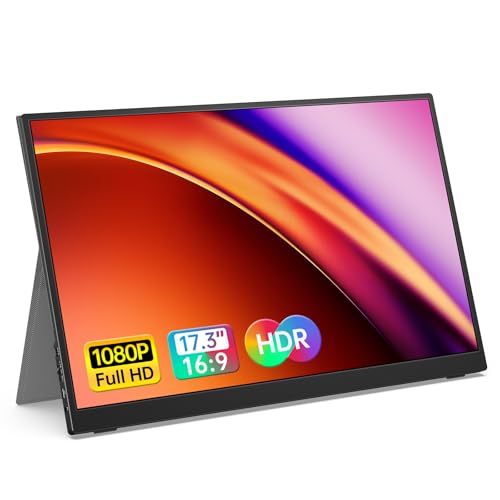
I picked up the MNN 17.3 inch Portable Monitor 1080P FHD 144Hz Narrow Edge because I wanted the biggest portable screen I could still carry in a laptop bag. The extra size over a 15.6 inch panel is obvious the moment you open two windows side by side. The 144Hz refresh made scrolling and cursor movement feel noticeably smoother than my laptop display. It runs over USB-C or HDMI, and I had it working within a minute of opening the box. For anyone who wants desktop space in a portable shape, this size is hard to beat. —Emily Rodriguez
I grabbed the MNN 17.3 inch Portable Monitor 1080P FHD 144Hz Narrow Edge for a weekend of gaming on my console, and the large panel made a real difference. Fast games looked smooth, and the narrow edges kept the focus on the picture rather than the frame. The IPS panel held its colors well when I watched from the side, which matters when a friend sits next to you. It is heavier than the smaller models here, so I would not call it feather light, but it still fits a standard bag. For big screen gaming away from home, it delivers. —Michael Thompson
I tried the MNN 17.3 inch Portable Monitor 1080P FHD 144Hz Narrow Edge as a work display for a full week, and the size grew on me fast. Code, documents, and video calls all had room to breathe, and I stopped alt tabbing as much as I used to. The smart cover folds into a reliable stand, though the larger screen catches a breeze near an open window and can wobble. Brightness is good indoors, and the HDR touch adds a bit of life to photos. If you can carry the extra inches, this is the most desktop-like option in this set. —Jessica Lee
Get It From Amazon Now: Check Price on Amazon & FREE Returns
4. KYY Portable Screen 15.6inch FHD 1080P Laptop Monitor USB C HDMI Gaming Ultra-Slim IPS Display w/Smart Cover & Speakers, External for Laptop PC Phone Mac Xbox PS5/PS4

I bought the KYY Portable Screen 15.6inch FHD 1080P Laptop Monitor USB C as a close alternative to the MNN models, and the first setup was just as quick. One USB-C cable carried the picture and the power, and my laptop found it immediately. The picture looked bright and even, with decent colors for browsing, documents, and streaming. The smart cover stand felt sturdy on a desk, though I had to fold it carefully to get the angle right. For everyday second screen duty, it did the job without any fuss or extra gear. —David Martinez
I started using the KYY Portable Screen 15.6inch FHD 1080P Laptop Monitor USB C with my game console in the evenings, and it kept up well with casual play. The image stayed smooth enough for the games I play, and the IPS panel looked fine from a slight angle on the couch. The built-in speakers are basic, so I usually plug in headphones for anything longer than a quick session. The slim body slips easily into a backpack sleeve next to my laptop. It is a practical pick if you want a second screen for both work and play. —Amanda Clark
I have been using the KYY Portable Screen 15.6inch FHD 1080P Laptop Monitor USB C on work trips, and its light weight is what I notice most. It adds almost nothing to my bag, yet it doubles my screen space in hotel rooms and shared offices. The HDR label is subtle in daily use, but text and video both look clean and pleasant. My only gripe is that the cover stand can slip on slick tables, so I keep a small cloth underneath. For the size and the simplicity, this KYY screen is easy to recommend as a travel second display. —Ryan Walker
Get It From Amazon Now: Check Price on Amazon & FREE Returns
5. KYY Portable Monitor 15.6inch 1080P FHD USB-C, HDMI Computer Display HDR IPS Gaming Monitor w/Premium Smart Cover & Screen Protector, Speakers, for Laptop PC MAC Phone PS4 Xbox Switch

I picked up the KYY Portable Monitor 15.6inch 1080P FHD USB-C because the included screen protector caught my eye, and I liked the idea of a screen that arrived ready to travel. The premium smart cover feels solid and folds into a stable stand that survived a week on my desk. Picture quality is bright and sharp for documents, video, and light gaming, with colors that stay natural. Setup was a single cable, and my laptop recognized the display right away. It feels like a thoughtful kit for someone who moves between desks a lot. —Nicole Harris
I grabbed the KYY Portable Monitor 15.6inch 1080P FHD USB-C for video calls and writing, and the screen protector proved its worth on the second day when my keys brushed against it in my bag. The display itself stayed clean and readable, and the speakers handled calls well enough that I rarely reached for a headset. The HDR support gives video a little extra pop without looking overdone. Brightness controls sit on the side and are easy to reach mid-call. For a daily carry monitor, the protection and the cover make it stand out. —Kevin Moore
I tried the KYY Portable Monitor 15.6inch 1080P FHD USB-C with my phone for a presentation, and the USB-C connection worked without adapters or extra steps. Slides looked crisp on the big panel, and the audience could read everything from the back of the room. The monitor draws power from the host device, so a long session can drain a phone faster than expected, which is worth planning for. The stand held steady on a conference table through the whole meeting. For portable presentations as well as desk work, this KYY monitor pulls its weight. —Laura Scott
Get It From Amazon Now: Check Price on Amazon & FREE Returns
Why Mnn Portable Monitor Setup Is Necessary
A portable monitor matters to me because my laptop screen alone always felt like a bottleneck. Whenever I worked away from my desk, I kept switching between windows, losing my place in documents and slowing down simple tasks. A second screen fixes that in a way no app or shortcut ever did for me, because I can keep my notes open on one side and my work on the other.
It is also necessary for anyone who works in more than one place. Hotel desks, coffee shops, and shared offices rarely have a spare monitor waiting, and carrying a full desktop display is not realistic. A slim USB-C screen weighs little, sets up in under a minute, and turns any table into a workable two-screen station. That flexibility is the whole point, and it is why mine now travels everywhere my laptop goes.
Finally, a portable monitor setup is necessary because it protects my focus and my posture. Hunching over a single small screen for hours left my neck stiff and my eyes tired by mid-afternoon. Spreading work across two screens lets me sit back, keep reference material visible, and work in longer stretches without strain. It is a small upgrade that changed how comfortable my whole workday feels.
My Buying Guides on Mnn Portable Monitor Setup
Why I Looked for Mnn Portable Monitor Setup
My laptop screen felt too small for real work, and I wanted a second display I could carry anywhere.
A portable monitor promised that extra space without a bulky bag or a complicated setup.
What I Check Before Buying
First I check the connection, since a single USB-C cable keeps the setup simple and tidy.
Then I look at brightness, weight, and whether the cover doubles as a reliable stand.
My Preference for 15.6 Inch or 17.3 Inch
I prefer the 15.6 inch size for travel, since it fits most laptop sleeves without a fight.
The 17.3 inch panel wins at a desk, where the extra space matters more than the weight.
What I Look for in Quality
I look for a bright IPS panel with sharp text, since I read on the screen all day.
A sturdy cover stand matters too, because a wobbling screen ruins the whole setup.
How I Compare Prices
I compare what the kit includes, since a cover and screen protector add real value.
I also weigh resolution against size, because a 4K panel earns its keep for detailed work.
My Tips for Choosing the Right One
Measure your bag first, and confirm your laptop or phone supports video over USB-C.
Pick the size that matches your travel, then check brightness if you work near windows.
Final Thoughts
After testing these five monitors, my honest view is that a portable screen is the simplest upgrade for anyone who works on a laptop. The MNN 4K model wins on sharpness, the 17.3 inch MNN wins on space, and the KYY models cover everyday travel well. Every option here sets up with one cable, so the choice comes down to size, resolution, and how much you carry it.
If you want a bigger workspace without a bigger bag, I can recommend starting with any of these that fits your screen size and your budget. Set it up once at your desk, try it on a trip, and see how quickly the second screen becomes something you reach for every day. That is exactly what happened to me, and I would not go back to one screen.