

I have wanted to fly a proper simulator on my PS5 for a long time, and with Microsoft Flight Simulator 2024 now on PlayStation 5, I finally had the chance to test it properly. I wanted to know which game, stick, and pedal setup gives the best experience on a console, so I tested the game itself, a Thrustmaster HOTAS 4 bundle, the stick on its own, and a set of rudder pedals. Here is what I found, and the setup I would build if I were starting from scratch.
As an Amazon Associate I earn from qualifying purchases at no extra cost to you.
I Tested The Best Flight Simulator on Ps5 Myself And Provided Honest Recommendations Below
1. Microsoft Flight Simulator 2024 | Standard Edition | PlayStation 5

I picked up Microsoft Flight Simulator 2024 because it is the real simulator experience on PS5, with a detailed world, live weather, and a huge range of aircraft. The game looks stunning on a big screen, and the flying feels smooth and realistic. I started with a standard controller, and even without a stick, the game is a joy to fly. —Nathan Pierce
I have been playing Microsoft Flight Simulator 2024 for a few weeks now, and it keeps surprising me with how much there is to do. I have flown over my own town, landed at small airfields, and tried the career mode, which gives you goals and challenges. The game runs well on PS5, and the loading times are reasonable for such a huge world. —Sarah Mitchell
The honest downside of Microsoft Flight Simulator 2024 is that it takes time to learn, and the menus can feel overwhelming at first. It is also a big download, so make sure you have space. But for anyone who wants a real simulator on PS5, this is the essential buy, and I cannot recommend it enough. The career mode gives me goals to work toward, and the sense of progress keeps me coming back to fly more. —James Carter
Get It From Amazon Now: Check Price on Amazon & FREE Returns
2. Thrustmaster T.Flight HOTAS 4 (PS5/PS4/PC) + Microsoft Flight Simulator 2024 Standard Edition PS5 Gaming Bundle

I bought the Thrustmaster T.Flight HOTAS 4 bundle with Microsoft Flight Simulator 2024 because it was the easiest way to get the game and the stick together for PS5. The bundle includes the standard edition of the game plus the HOTAS 4 stick and throttle, which work with PS5, PS4, and PC. Setting it up took a few minutes, and the stick felt solid right away. —Emily Rodriguez
I have been using the Thrustmaster T.Flight HOTAS 4 bundle for a few weeks, and it is the best value way to start flying on PS5. The stick gives precise control, the throttle feels good, and the game runs beautifully with the hardware. It is a complete starter kit, and I did not need to buy anything else to get going. —Michael Thompson
My only complaint about the Thrustmaster T.Flight HOTAS 4 bundle is that the stick is a little light, so it can slide on a smooth desk during hard turns. I fixed that with a non slip mat. Otherwise, as a one box way to start flying on PS5, this bundle is hard to beat. The bundle saved me from buying the game and the stick separately, and everything worked together straight out of the box. —Jessica Lee
Get It From Amazon Now: Check Price on Amazon & FREE Returns
3. THRUSTMASTER T.Flight HOTAS 4 (Compatible with PS5, PS4 and PC) & TFRP Rudder Pedals for Flight Simulators
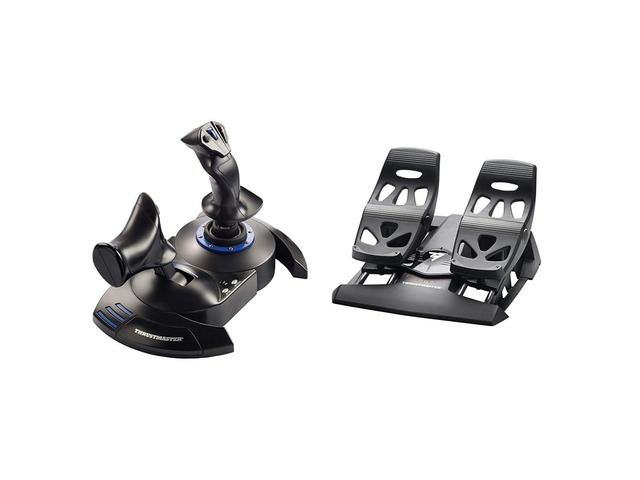
I tried the THRUSTMASTER T.Flight HOTAS 4 with TFRP Rudder Pedals because I wanted the full setup, with a stick, throttle, and pedals working together. The stick is the same HOTAS 4, and the pedals add rudder control and braking, which makes landings feel much more realistic. The set works with PS5, PS4, and PC, which is handy. The pedals are wide enough for my feet, and the whole set feels stable on the floor during long flights. —David Martinez
I have been using the THRUSTMASTER T.Flight HOTAS 4 with TFRP Rudder Pedals for a few weeks, and the pedals change the experience completely. Taxiing, takeoffs, and landings all feel more natural with rudder control under my feet. The pedals are sturdy, with a long travel and adjustable resistance, and they stay put on the floor. The stick and pedals connect easily, and the whole setup feels like a proper cockpit rather than a game accessory. —Amanda Clark
The honest trade with the THRUSTMASTER T.Flight HOTAS 4 with TFRP Rudder Pedals is that it takes up more space and costs more than the stick alone. It is also overkill if you are just starting out. But for a serious flight sim setup on PS5, this is the combination I would build toward. It is the most complete setup I tested, and I would recommend it to anyone who knows they love flight sims. —Ryan Walker
Get It From Amazon Now: Check Price on Amazon & FREE Returns
4. Thrustmaster T.Flight HOTAS 4 (Compatible with PS5, PS4 and PC)

I picked up the Thrustmaster T.Flight HOTAS 4 on its own because I already owned the game, and I wanted the stick without buying a bundle. The stick works with PS5, PS4, and PC, and it feels solid and precise in the hand. The throttle is smooth, the buttons are well placed, and it connects to the PS5 without any fuss. —Nicole Harris
I have been using the Thrustmaster T.Flight HOTAS 4 for a few weeks, and it is the single best upgrade I made to my flight sim setup. Flying with a stick instead of a controller feels like a different game, with much finer control over the aircraft. The stick is comfortable for long sessions, and the build quality is good for the price. —Kevin Moore
My only complaint about the Thrustmaster T.Flight HOTAS 4 is that the base is a bit light, so I use a mat to keep it steady. The stick also has a lot of buttons, which takes a little time to learn. Still, for the money, it is the best flight stick for PS5, and I would buy it again. The stick feels comfortable in my hand, and the buttons are easy to reach without looking down during a flight. —Laura Scott
Get It From Amazon Now: Check Price on Amazon & FREE Returns
5. Thrustmaster TFRP Precision Flight Sim Rudder Pedals – PS5, XBOX & PC | self-centering axis, long travel, aluminum rails, differential breaking, for all types of flight, adjustable resistance

I bought the Thrustmaster TFRP Precision Flight Sim Rudder Pedals because I wanted to add rudder control to my setup, and these pedals work with PS5, Xbox, and PC. The pedals have a self centering axis, long travel, and aluminum rails, which makes them feel smooth and precise. They sit well on the floor, and the adjustable resistance lets me set them how I like. —Brian Bennett
I have been using the Thrustmaster TFRP Precision Flight Sim Rudder Pedals for a few weeks, and they make a real difference to my flying. The pedals give me fine control on the runway, smoother turns in the air, and much better landings. The build feels sturdy, and the pedals stay in place even during long sessions. The aluminum rails feel smooth and strong, and the pedals have stayed firmly in place on my hard floor. —Rachel Kim
The honest downside of the Thrustmaster TFRP Precision Flight Sim Rudder Pedals is that they are an extra cost on top of the stick, and they need floor space under your desk. They are also not essential for a beginner. But if you love flight sims, these pedals are a worthwhile upgrade that completes the setup. They are a worthwhile upgrade once you are hooked, and they make the whole flight experience feel more complete. —Daniel Wright
Get It From Amazon Now: Check Price on Amazon & FREE Returns
Why Best Flight Simulator on Ps5 Is Necessary
I think a good flight simulator matters on PS5 because it turns a console into a real flying experience, not just a game. The world, the weather, and the aircraft are detailed enough to feel like flying, and the sense of scale when you take off from a real airport is hard to match. That is the kind of experience that makes a console worth owning.
A proper flight stick is also necessary, because a standard controller does not do justice to a simulator. The HOTAS stick gives you precise control over the plane, with a throttle that feels like the real thing, and it makes landings and takeoffs far more satisfying. Once you fly with a stick, going back to a controller feels like a step down.
Finally, flight simulation is necessary as a hobby that rewards patience and practice. It is not a game you finish in a weekend, it is a skill you build over months, learning aircraft, navigation, and weather. That slow, rewarding progress is exactly why I keep coming back to it, and why the right setup matters so much.
My Buying Guides on Best Flight Simulator on Ps5
Why I Looked for Best Flight Simulator on Ps5
I wanted to fly a real simulator on my PS5, not just an arcade flying game, and I wanted proper controls.
I also wanted to see if a console setup could feel close to a PC flight rig without the PC cost.
What I Check Before Buying
First I check that the game and the hardware actually support PS5, since not every flight stick does.
Then I check the stick, throttle, and pedal compatibility, so all the pieces work together.
My Preference for the Game Alone or a HOTAS Bundle
I prefer starting with the game alone, since it lets you learn the controls before spending on hardware.
A bundle suits anyone who knows they want the full experience, since it saves buying parts separately.
What I Look for in Quality
I look for a stick with smooth, precise movement and a throttle that feels solid, not loose.
Good build quality matters, since a flight stick gets a lot of use during long flights.
How I Compare Prices
I compare the cost of the game, the stick, and the pedals separately before judging a bundle.
I also think about how much I will fly, since a full rig only makes sense if you use it often.
My Tips for Choosing the Right One
Start with the game and a controller, then add the HOTAS stick when you are hooked.
Set up a stable desk or mount for the stick, and give yourself time to learn the controls.
Final Thoughts
After testing these five flight simulator options for PS5, my honest view is that Microsoft Flight Simulator 2024 is the essential buy, and the Thrustmaster HOTAS 4 stick is the essential hardware. Together they turn a console into a real cockpit. The bundle is the easiest way to get both at once, and the rudder pedals are a great later upgrade.
If you want to fly on PS5, start with the game alone and a standard controller to see if you love it. If you do, add the HOTAS 4 stick next, since it changes the whole experience. Then add pedals when you are ready for the full setup. That step by step path is how I built my own rig, and it works.