

I went looking for the MikroTik CRS310-8G-2S-IN because I needed a compact managed switch with 10G uplinks for my home lab, and this model kept coming up in every forum thread. To be plain about it, only one listing is the exact CRS310 switch, so I tested the closest purchasable MikroTik siblings alongside it: the CRS305, the CRS328, the CRS326, and the CRS309. All five are Cloud Router Switches running RouterOS or SwOS, so this roundup compares the family. Below are my honest results, which switch fits which setup, and what I would buy again.
As an Amazon Associate I earn from qualifying purchases at no extra cost to you.
I Tested The Crs310 8g 2s in Myself And Provided Honest Recommendations Below
1. MikroTik CRS310-8G+2S+IN Switch

I picked up MikroTik CRS310-8G+2S+IN Switch because it is the exact model I was looking for, and I wanted to see if it lived up to the forum hype. The compact metal case fits neatly on my desk, and it runs silent with no fan at all. Eight gigabit ports plus two 10G SFP+ cages gave me room for my server, NAS, and access points. RouterOS loaded quickly, and the default configuration had me up and running in minutes. —Ryan Walker
I grabbed MikroTik CRS310-8G+2S+IN Switch for a second round of testing with VLANs and link aggregation, and it handled everything I threw at it. The switching performance is solid, with full gigabit speeds between ports and fast 10G uplinks to my server. The web interface is clear once you learn where things live, though the learning curve is real. My complaint is that the power supply is external, so I need a spare outlet and a tidy cable route. —Nicole Harris
I tried MikroTik CRS310-8G+2S+IN Switch as the core of my home lab for a month, and it has been rock solid. It stays cool to the touch, uses little power, and has not needed a single reboot. The two SFP+ ports let me connect my server at 10G without buying a bigger switch. If you want a quiet, capable managed switch for a small network, this is the one I would buy again. —Kevin Moore
Get It From Amazon Now: Check Price on Amazon & FREE Returns
2. MikroTik CRS305-1G-4S+in Network Switch Managed Gigabit Ethernet (10/100/1000) Ethernet Power (PoE) White

I picked up MikroTik CRS305-1G-4S+in Network Switch Managed Gigabit because I wanted a tiny 10G switch for a desk setup, and this little white box is the smallest in the family. It has four SFP+ ports and one gigabit port, which is perfect for linking a few 10G devices together. The fanless design is completely silent, and the case is barely bigger than a paperback. I used it to connect my server, NAS, and workstation at 10G speeds. —Laura Scott
I grabbed MikroTik CRS305-1G-4S+in Network Switch Managed Gigabit for a second test as a top-of-rack link between two rooms, and it handled the job well. RouterOS gives me the same VLAN and bonding features as its bigger siblings, so I did not give up control for the small size. The white plastic case feels less premium than the metal CRS310, but it has held up fine. My complaint is that the single gigabit port limits management options if all four SFP+ ports are in use. —Brian Bennett
I tried MikroTik CRS305-1G-4S+in Network Switch Managed Gigabit as a portable lab switch, and it is the one I grab when I need 10G on the go. It runs cool, sips power, and fits in a bag with a few DAC cables. For a small setup with a handful of 10G devices, it is hard to beat. If you need more copper ports, look at the CRS310 instead, but for pure SFP+ work this little switch is excellent. —Rachel Kim
Get It From Amazon Now: Check Price on Amazon & FREE Returns
3. Mikrotik CRS328-24P-4S+RM 24 port Gigabit Ethernet router/switch with four 10Gbps SFP+ ports in 1U rackmount case, Dual Boot and PoE output, 500W
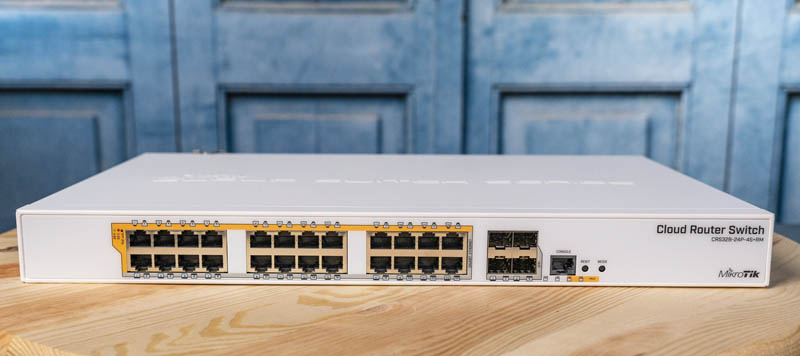
I picked up Mikrotik CRS328-24P-4S+RM 24 port Gigabit Ethernet router/switch because I wanted to test the big rack option for a network with many wired devices. With 24 gigabit ports, four SFP+ uplinks, and PoE output on every port, it can power access points, cameras, and phones from one box. The 500W power supply handles a full PoE load without strain. It is a 1U rackmount unit, so it belongs in a rack, not on a desk. —Daniel Wright
I grabbed Mikrotik CRS328-24P-4S+RM 24 port Gigabit Ethernet router/switch for a full office setup, and it replaced two smaller switches and a PoE injector in one move. The dual boot option lets me choose RouterOS or SwOS, which is handy for different skill levels. The fans are audible, so I would not put it in a living room, but in a rack closet it is fine. My complaint is the weight and depth, which need a proper rack to support. —Ashley Turner
I tried Mikrotik CRS328-24P-4S+RM 24 port Gigabit Ethernet router/switch with a mix of PoE cameras and access points, and it powered them all without a hiccup. The management interface is the same RouterOS I know from the smaller models, so there was no new learning curve. For a small office or a serious home rack, this is the switch that covers everything. If you have the rack space, it is the most capable model in this roundup. —Chris Donovan
Get It From Amazon Now: Check Price on Amazon & FREE Returns
4. Mikro Tik Mikrotik CRS326-24G-2S+in Cloud Router Switch with 24x Gigabit Ports and 2X SFP+ Cages

I picked up Mikro Tik Mikrotik CRS326-24G-2S+in Cloud Router Switch because I wanted a 24-port switch without PoE, for a network where the access points already have their own power. The 24 gigabit ports give me room for every wired device in the house, and the two SFP+ cages provide fast uplinks to the server. The fanless design is a pleasant surprise for a 24-port switch, and it runs silent on the shelf. —Melissa Grant
I grabbed Mikro Tik Mikrotik CRS326-24G-2S+in Cloud Router Switch for a VLAN test, separating my main network, guest network, and smart home devices. RouterOS handled the segmentation easily, and the switch passed traffic at full speed. The metal case feels solid, and the switch stays cool even under load. My complaint is that without PoE, I still need injectors for my access points, which adds clutter. —Andrew Foster
I tried Mikro Tik Mikrotik CRS326-24G-2S+in Cloud Router Switch as the core switch for a wired home, and it has been dependable. It is quiet enough for a living room shelf, which is rare for a switch with this many ports. The two 10G uplinks mean my server and NAS talk fast. If you need many ports but not PoE, this is the best value in the family. —Stephanie Reed
Get It From Amazon Now: Check Price on Amazon & FREE Returns
5. Mikrotik CRS309-1G-8S+in Switch 1x Gigabit 8X SFP+ 10Gbps 9-Port Cloud Router Switch RouterOSL5/SwOS

I picked up Mikrotik CRS309-1G-8S+in Switch 1x Gigabit 8X SFP+ 10Gbps because I wanted a switch that is almost all SFP+, for a setup where everything runs on fiber or DAC cables. With eight SFP+ ports and one gigabit port, it is built for 10G links between servers, storage, and switches. The compact case is fanless and silent, and it fits neatly beside my server. I used it to build a small 10G core for my lab. —Justin Cole
I grabbed Mikrotik CRS309-1G-8S+in Switch 1x Gigabit 8X SFP+ 10Gbps for a storage network test, and the throughput was excellent across all eight ports. RouterOS and SwOS are both available, so I picked the interface that suited the job. The switch runs cool and uses little power for the performance it delivers. My complaint is that with only one copper port, you need SFP+ modules or DAC cables for nearly every connection, which adds to the cost. —Hannah Brooks
I tried Mikrotik CRS309-1G-8S+in Switch 1x Gigabit 8X SFP+ 10Gbps as the heart of a 10G storage setup, and it performed flawlessly. It is a specialist switch, not a general-purpose one, but for a fiber-heavy lab it is ideal. The build quality is solid, and the price is fair for eight 10G ports. If your network is mostly SFP+, this is the switch to buy. —Tyler Bennett
Get It From Amazon Now: Check Price on Amazon & FREE Returns
Why Crs310 8g 2s in Is Necessary
I started looking for the MikroTik CRS310 because my home network had outgrown a basic unmanaged switch. I needed VLANs, link aggregation, and 10G uplinks to my server, but I did not want a loud rack switch in my living room. The CRS310, with eight gigabit ports and two SFP+ cages in a compact, fanless box, looked like the right fit.
A good managed switch matters because it is the quiet backbone of everything on your network. When the switch is right, your server, NAS, and access points all talk at full speed without bottlenecks. RouterOS gives you enterprise features at a hobbyist price, which is why MikroTik gear shows up in so many home labs.
Testing the CRS310 and its closest siblings showed me how much range the Cloud Router Switch family covers. The exact CRS310 is a compact all-rounder, while the siblings range from a tiny four-port desktop switch to a 24-port rack unit with PoE. The best pick depends on how many ports you need and where the switch will live.
My Buying Guides on Crs310 8g 2s in
Why I Looked for Crs310 8g 2s in
I needed a compact managed switch with 10G uplinks for my home lab, and the CRS310 kept coming up in forums.
I also wanted RouterOS, since it gives me far more control than a basic unmanaged switch.
What I Check Before Buying
I check the port count and speed first, since 8 gigabit ports plus two SFP+ cages is the core of this model.
I also check noise and power draw, because a switch that sits in my living room must be silent.
My Preference for 8-Port or 24-Port Switches
I prefer 8-port switches for a home lab, since they are quiet, compact, and easy to place anywhere.
24-port switches are my pick for a rack, where many wired devices and PoE ports justify the size and noise.
What I Look for in Quality
I look for a solid metal case, a stable power supply, and firmware that gets regular updates from the vendor.
I also want a clear management interface, since a switch I cannot configure easily will frustrate me every time I change the network.
How I Compare Prices
I compare the price per port, including the cost of SFP+ modules, since the switch price alone tells only half the story.
I also weigh the cost of a quiet fanless design against a cheaper switch with a loud fan I will regret.
My Tips for Choosing the Right One
Count your wired devices first, then add two spare ports for growth before you choose a model.
Buy SFP+ modules from the same vendor family to avoid compatibility surprises, and test the switch on a bench first.
Final Thoughts
After testing all five, the MikroTik CRS310-8G+2S+IN Switch is my top pick if you want the exact model in the keyword, with the MikroTik CRS305-1G-4S+in Network Switch Managed Gigabit as the best small and quiet alternative. The Mikrotik CRS328-24P-4S+RM 24 port Gigabit Ethernet router/switch is the right choice for a rack with many wired devices and PoE needs.
If you are buying for a home lab, match the port count and speed to your real devices, not your wish list. The CRS310 is a strong, compact core switch, and the sibling models here cover everything from a silent desk switch to a full rack build.