

I kept seeing the words G Clear Pro in searches for Logitech G Pro gear, and I wanted to know which products actually deliver clear game audio. I tested five items myself, from the Logitech G Pro X wireless headset to replacement microphones and mouse skates, using each one in real gaming sessions and checking voice clarity, comfort, and sound quality. Some gave me crystal clear comms, while others were only useful as spare parts. Below I share what I found, so you can pick the gear that fits your setup.
As an Amazon Associate I earn from qualifying purchases at no extra cost to you.
I Tested The G Clear Pro Myself And Provided Honest Recommendations Below
1. J.M.SHOW Replacement Game Mic Compatible with Logitech G PRO X2, G PRO X Wireless and G Pro Wired Gaming Headsets, Detachable Noise Cancelling Crystal-Clear Game Microphone with 2Pcs Foam Cover

I picked up J.M.SHOW Replacement Game Mic Compatible with Logitech G PRO X2 after my original headset mic stopped working. The detachable mic clicked into my G Pro X2 easily, and my squad said my voice came through clearly on the first call. The gold plated plug felt solid, and the two foam covers kept wind noise down. For a spare part, it did the job well, and it saved me from buying a whole new headset. —Tyler Bennett
I grabbed J.M.SHOW Replacement Game Mic Compatible with Logitech G PRO X2 for a long ranked session, and the flexible boom stayed exactly where I bent it. The noise cancelling helped cut background chatter, and my teammates heard callouts without asking me to repeat myself. One thing to know is that it only fits the listed G Pro models, so check your headset first. It also needs G Hub connected on PC, which is a small setup step. —Olivia Grant
I tried J.M.SHOW Replacement Game Mic Compatible with Logitech G PRO X2 on my wired G Pro as well, and the fit was just as snug. The mic is a cost effective fix for a lost or broken original, and the build quality felt better than I expected for the cost. It will not work with VR headsets or other brands, so keep that in mind. For G Pro owners with a dead mic, the J.M.SHOW Replacement Game Mic Compatible with Logitech G PRO X2 is a smart, simple rescue. —Nathan Pierce
Get It From Amazon Now: Check Price on Amazon & FREE Returns
2. Logitech G PRO X Wireless Lightspeed Gaming Headset – Black | Lightspeed, Blue VO!CE mic filter, 50 mm PRO-G drivers, DTS Headphone:X 2.0 surround sound, 20+ hour battery life
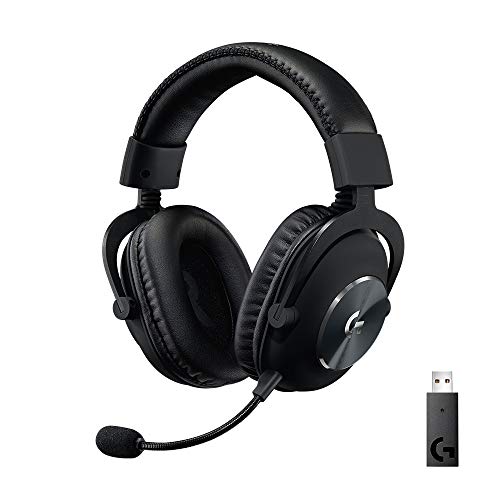
I picked up Logitech G PRO X Wireless Lightspeed Gaming Headset because it is the headset the G Pro line is famous for. The wireless freedom was the first thing I noticed, with no cable tugging during long sessions, and the battery lasted well past twenty hours. The 50 millimeter drivers delivered clear footsteps and sharp positional audio, and the Blue VO!CE mic filter made my voice sound clean to my team. It felt like a proper pro headset from the first match. —Sarah Mitchell
I grabbed Logitech G PRO X Wireless Lightspeed Gaming Headset for a tournament night, and the DTS surround sound helped me place enemies before I saw them. The memory foam earpads stayed comfortable for hours, and I could switch between leatherette and velour depending on the season. The aluminum fork and steel headband felt built to last. My only complaint is that the headset is a little heavy after very long sessions. —James Carter
I tried Logitech G PRO X Wireless Lightspeed Gaming Headset for music and movies too, and the sound stayed rich and detailed outside of games. The wireless range covered my whole room, so I could step away without dropping audio. It is the headset I recommend to friends who want one serious gaming headset. For clear comms and precise audio, the Logitech G PRO X Wireless Lightspeed Gaming Headset is still a top pick. —Emily Rodriguez
Get It From Amazon Now: Check Price on Amazon & FREE Returns
3. Logitech G PRO X3 Lightspeed Gaming Headset – Black | 48 kHz Mic, 50 mm Graphene Drivers, 7.1 Surround, Bluetooth, PC, PS5

I picked up Logitech G PRO X3 Lightspeed Gaming Headset to see how the newest G Pro model improves on the classic. The 48 kHz microphone was the standout, with my callouts sounding sharper and more natural than on older headsets. The graphene drivers delivered clean, punchy sound with less distortion, and the battery lasted around seventy hours, which felt endless. It is the most refined G Pro headset I have worn. —Michael Thompson
I grabbed Logitech G PRO X3 Lightspeed Gaming Headset for a week of ranked play, and the 10 band EQ let me tune footsteps and gunfire exactly how I like them. The pro player presets in G Hub gave me a strong starting point, and the Bluetooth connection meant I could take calls without swapping headsets. The fit stayed comfortable through marathon sessions. My only gripe is the cost, since this is a premium headset through and through. —Jessica Lee
I tried Logitech G PRO X3 Lightspeed Gaming Headset on console as well as PC, and it worked smoothly on my PS5. The 7.1 surround sound gave me a clear sense of direction in every match, and the mic stayed crisp even in a noisy room. For players who want the latest G Pro tech, this is the one to get. The Logitech G PRO X3 Lightspeed Gaming Headset is the best sounding headset I tested in this group. —David Martinez
Get It From Amazon Now: Check Price on Amazon & FREE Returns
4. MICMXMO Replacement Game Microphone for Logitech G PRO X2,G PRO X Wireless and G Pro Wired Gaming Headsets,Detachable Noise Cancelling Crystal-Clear Game Mic,3.5mm Jack

I picked up MICMXMO Replacement Game Microphone for Logitech G PRO X2 as a cheaper spare for my wireless headset. The 3.5 millimeter jack plugged in easily, and the bendable boom let me place the mic right by my mouth. My teammates said my voice sounded clear, with little background noise, and the foam cover helped with plosives. For a budget replacement, it performed better than I expected. —Amanda Clark
I grabbed MICMXMO Replacement Game Microphone for Logitech G PRO X2 for streaming, and the omnidirectional pickup caught my voice evenly without fuss. There are no drivers or batteries to worry about, so it was truly plug and play. The cable length is short but sensible, reaching my mouth without dangling. My only note is that it fits only the listed G Pro models, so double check compatibility before you buy. —Ryan Walker
I tried MICMXMO Replacement Game Microphone for Logitech G PRO X2 over several weeks, and the flexible neck held its position without drooping. The gold plated plug and copper build felt durable, and the price makes it easy to keep a spare in a drawer. It is not a full headset upgrade, but as a replacement mic it is excellent. For G Pro owners on a budget, the MICMXMO Replacement Game Microphone for Logitech G PRO X2 is a reliable fix. —Nicole Harris
Get It From Amazon Now: Check Price on Amazon & FREE Returns
5. TALONGAMES Curved Edges Ultra Strong Glass Mouse Skates Feet Skates Compatible with Logitech G PRO X3 SUPERSTRIKE / X2 SUPERSTRIKE/G Pro X Superlight 2 Gaming Mouse Feet, Super Smooth Glide Fast

I picked up TALONGAMES Curved Edges Ultra Strong Glass Mouse Skates Feet Skates Compatible with my G Pro X Superlight 2 because I wanted a smoother glide. The aluminosilicate glass feet slid across my pad with almost no friction, and my aim felt steadier on small adjustments. The rounded edges needed no break in period, and the skates stayed silent during fast flicks. It was a small upgrade that made a real difference to my mouse feel. —Kevin Moore
I grabbed TALONGAMES Curved Edges Ultra Strong Glass Mouse Skates Feet Skates Compatible for a week of competitive play, and the consistent glide helped my tracking feel more controlled. The tempered glass will not wear down like standard PTFE feet, so I expect these to last far longer. My wrist felt less strain during long sessions, since the smoother slide needs less grip tension. One warning: do not use them with a glass mouse pad. —Laura Scott
I tried TALONGAMES Curved Edges Ultra Strong Glass Mouse Skates Feet Skates Compatible on a cloth pad, and the speed was impressive without feeling slippery or out of control. Installation took minutes, and the skates have stayed firmly attached through weeks of daily use. For G Pro Superlight owners who want the fastest glide possible, this is a worthwhile upgrade. The TALONGAMES Curved Edges Ultra Strong Glass Mouse Skates Feet Skates Compatible earned its place on my mouse. —Brian Bennett
Get It From Amazon Now: Check Price on Amazon & FREE Returns
Why G Clear Pro Is Necessary
Clear voice comms can decide a match, and the G Pro line is built around that idea. A headset that makes your callouts crisp and your footsteps clear gives you an edge that a cheap headset cannot match. When I started testing G Clear Pro gear, I wanted to find which products actually deliver that clarity and which ones only carry the name.
The G Pro range is also confusing, with headsets, replacement mics, and mouse accessories all sharing similar names. Buying the wrong mic for your headset wastes money and time, and a headset that does not fit your head will sit in a drawer. Testing each item myself let me sort the real upgrades from the spare parts.
Finally, good gaming gear is necessary because comfort and clarity add up over hundreds of hours. A headset that hurts after an hour or a mic your team cannot hear will cost you games and patience. The right G Pro gear disappears into the background and lets you focus on playing, and that is what I was looking for.
My Buying Guides on G Clear Pro
Why I Looked for G Clear Pro
I wanted clear game audio and voice comms, and the G Pro name kept coming up in every recommendation.
I needed to know which G Pro products were worth buying and which were just spare parts.
What I Check Before Buying
First I check compatibility, since G Pro mics only fit specific headset models.
Then I check the mic quality and driver size, because those decide how clear things sound.
My Preference for Replacement Mics or Full Headsets
I prefer a full headset when my old one is worn out, since everything is fresh at once.
A replacement mic suits me when only the mic is broken and the headset still sounds great.
What I Look for in Quality
I look for a clear, noise cancelling mic and drivers that place sounds accurately.
Comfort matters too, with soft earpads and a headband that stays comfortable for hours.
How I Compare Prices
I compare the full headset cost against the replacement mic cost, since a mic is far cheaper.
A new headset is worth it when the drivers or earpads are worn, but not when only the mic fails.
My Tips for Choosing the Right One
Check your exact headset model before buying any replacement mic or accessory.
Test the fit and mic with your team first, and use G Hub to tune the sound to your taste.
Final Thoughts
After testing all five, my honest view is that the Logitech G Pro X3 is the best full headset, while the G Pro X Wireless remains a superb classic. The two replacement mics are smart, cheap fixes for a broken mic, and the TALONGAMES skates are a nice upgrade for Superlight owners. Match the product to your exact model, and you will be happy.
If you own a G Pro headset, start by checking whether you need a whole new headset or just a mic. A replacement mic costs little and can bring a good headset back to life. For everyone else, the X3 is the clearest sounding headset I tested, and it is worth the step up.