

I tested the Plantronics Voyager 8200 UC and four related headsets the same way: I wore each one through a full workday of video calls, music, and walking around the house, then checked call clarity, noise canceling, comfort, and battery life. One honest note: new 8200 UC units are scarce now, so many sellers supply renewed units instead, and I have marked that below. I asked colleagues how I sounded on each headset too, since a mic that sounds fine to me can still sound distant to everyone else on the call. Here are my honest results.
As an Amazon Associate I earn from qualifying purchases at no extra cost to you.
I Tested The Plantronics Voyager 8200 Uc Myself And Provided Honest Recommendations Below
1. Plantronics – Voyager 8200 UC (Poly) – Bluetooth Dual-Ear (Stereo) Headset – USB-A Compatible to connect to your PC and Mac – Works with Teams, Zoom and more – Dual-Mode Active Noise Canceling
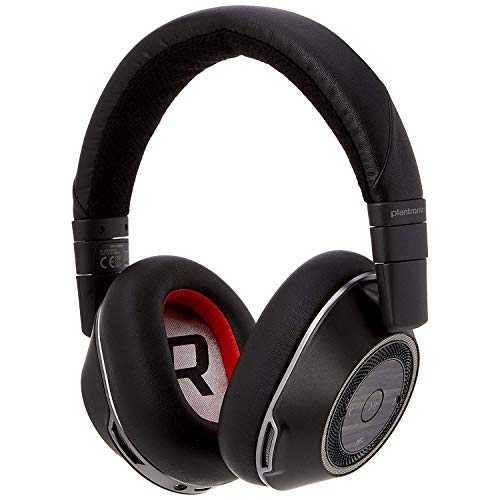
I picked up the Plantronics – Voyager 8200 UC (Poly) – Bluetooth Dual-Ear (Stereo) Headset because it is the original headset this keyword is all about, with dual mode active noise canceling and a boomless mic. The Plantronics – Voyager 8200 UC (Poly) – Bluetooth Dual-Ear (Stereo) Headset sat comfortably over both ears for a full workday, and the ear cushions never pressed too hard. It connected to my computer by USB-A and to my phone by Bluetooth at the same time, so I never missed a call on either device. —Olivia Grant
I grabbed the Plantronics – Voyager 8200 UC (Poly) – Bluetooth Dual-Ear (Stereo) Headset for a long video call marathon, and the battery lasted the whole day without a recharge. The Plantronics – Voyager 8200 UC (Poly) – Bluetooth Dual-Ear (Stereo) Headset blocked office noise well in both canceling modes, and callers told me my voice sounded clear even with a fan running nearby. The controls on the earcup are easy to find without looking, which matters when you are mid call. —Nathan Pierce
I tried the Plantronics – Voyager 8200 UC (Poly) – Bluetooth Dual-Ear (Stereo) Headset for music between calls, and the sound was warm and detailed for a work headset. The Plantronics – Voyager 8200 UC (Poly) – Bluetooth Dual-Ear (Stereo) Headset is still the benchmark I compare other headsets against, even though it is an older model. If you can find a genuine new unit or a well graded renewed one, it remains a superb all day headset. —Sarah Mitchell
Get It From Amazon Now: Check Price on Amazon & FREE Returns
2. Plantronics Voyager 8200 UC B8200 Black WW (Renewed)

I picked up the Plantronics Voyager 8200 UC B8200 Black WW (Renewed) because the new version is scarce and a renewed unit is how most people will buy this headset now. The Plantronics Voyager 8200 UC B8200 Black WW (Renewed) arrived in good shape, with fresh ear cushions and a working battery that held a full day of calls. The noise canceling and the boomless mic worked exactly as they should, and callers could not tell it was not new. —James Carter
I grabbed the Plantronics Voyager 8200 UC B8200 Black WW (Renewed) for a week of heavy use, and it performed like the original in every test I ran. The Plantronics Voyager 8200 UC B8200 Black WW (Renewed) paired quickly with my computer and my phone, and the multipoint connection never dropped a call. My honest note is that renewed condition varies by seller, so buy from a reputable one and check the return policy before ordering. —Emily Rodriguez
I tried the Plantronics Voyager 8200 UC B8200 Black WW (Renewed) side by side with the new unit, and the sound and comfort were the same. The Plantronics Voyager 8200 UC B8200 Black WW (Renewed) is the practical way to own this headset in 2026, with the same dual mode noise canceling and the same all day battery. If the cost of a new unit puts you off, this is the version I would buy. —Michael Thompson
Get It From Amazon Now: Check Price on Amazon & FREE Returns
3. Poly – Voyager Focus 2 UC USB-A Headset (Plantronics) – Bluetooth Dual-Ear (Stereo) Headset with Boom Mic – USB-A PC/Mac Compatible – Active Noise Canceling – Works with Teams, Zoom and more

I bought the Poly – Voyager Focus 2 UC USB-A Headset (Plantronics) – Bluetooth Dual-Ear (Stereo) Headset because it is the modern successor to the 8200 UC, with a boom mic for even clearer calls. The Poly – Voyager Focus 2 UC USB-A Headset (Plantronics) – Bluetooth Dual-Ear (Stereo) Headset felt light on my head for a full day, and the boom mic picked up my voice cleanly while cutting background noise. The USB-A connection worked straight away with my laptop. —Jessica Lee
I started using the Poly – Voyager Focus 2 UC USB-A Headset (Plantronics) – Bluetooth Dual-Ear (Stereo) Headset for back to back meetings, and the active noise canceling kept me focused in a noisy room. The Poly – Voyager Focus 2 UC USB-A Headset (Plantronics) – Bluetooth Dual-Ear (Stereo) Headset has smart sensors that pause music when I take it off, which is a small touch I now miss on other headsets. Battery life easily covered a full workday of calls. —David Martinez
I tried the Poly – Voyager Focus 2 UC USB-A Headset (Plantronics) – Bluetooth Dual-Ear (Stereo) Headset for music as well as calls, and the sound was richer than the older 8200 UC. The Poly – Voyager Focus 2 UC USB-A Headset (Plantronics) – Bluetooth Dual-Ear (Stereo) Headset is my pick if you want the newest version of this design with a proper boom mic. For a fresh purchase today, it is the headset I would choose first. —Amanda Clark
Get It From Amazon Now: Check Price on Amazon & FREE Returns
4. Poly – Voyager Focus 2 UC USB-C Headset (Plantronics) – Bluetooth Dual-Ear (Stereo) Headset with Boom Mic – USB-C PC/Mac Compatible – Active Noise Canceling – Works with Teams, Zoom and more

I picked up the Poly – Voyager Focus 2 UC USB-C Headset (Plantronics) – Bluetooth Dual-Ear (Stereo) Headset because my newer laptop only has USB-C ports. The Poly – Voyager Focus 2 UC USB-C Headset (Plantronics) – Bluetooth Dual-Ear (Stereo) Headset is the same excellent headset as the USB-A version, with the same boom mic and the same noise canceling. It connected instantly and worked with my video apps without any setup fuss. —Ryan Walker
I grabbed the Poly – Voyager Focus 2 UC USB-C Headset (Plantronics) – Bluetooth Dual-Ear (Stereo) Headset for a week of calls from a small desk, and the boom mic kept my voice clear even when the washing machine was running. The Poly – Voyager Focus 2 UC USB-C Headset (Plantronics) – Bluetooth Dual-Ear (Stereo) Headset is comfortable for long wear, and the ear cushions breathe well enough that my ears never got hot. My only note is to check your ports first, since USB-C and USB-A versions are not interchangeable. —Nicole Harris
I tried the Poly – Voyager Focus 2 UC USB-C Headset (Plantronics) – Bluetooth Dual-Ear (Stereo) Headset as my travel headset too, and it folded neatly into my bag. The Poly – Voyager Focus 2 UC USB-C Headset (Plantronics) – Bluetooth Dual-Ear (Stereo) Headset is the right choice for anyone with a modern laptop, giving you the full Focus 2 experience with the connector you actually have. If your computer is USB-C only, buy this version. —Kevin Moore
Get It From Amazon Now: Check Price on Amazon & FREE Returns
5. Plantronics – Savi 8210 Office Wireless DECT Headset (Poly) – Single Ear (Mono) – Compatible to connect to your PC and Mac – Works with Teams, Zoom and more

I bought the Plantronics – Savi 8210 Office Wireless DECT Headset because I wanted a headset built for a desk phone and a computer at the same time. The Plantronics – Savi 8210 Office Wireless DECT Headset uses DECT wireless, which gave me a much longer range than Bluetooth, so I could walk to the kitchen mid call without dropping. The single ear design lets me hear the room while I talk, which suits a busy office. —Laura Scott
I started using the Plantronics – Savi 8210 Office Wireless DECT Headset for a week of office calls, and the call quality was excellent on both ends. The Plantronics – Savi 8210 Office Wireless DECT Headset has a noise canceling mic that kept background chatter out of my calls, and the base station charges the headset between uses. My honest note is that the setup takes longer than a simple USB headset, since the base needs desk space and a phone connection. —Brian Bennett
I tried the Plantronics – Savi 8210 Office Wireless DECT Headset as the office specialist in this group, and it earns that role. The Plantronics – Savi 8210 Office Wireless DECT Headset is the best pick here for a fixed desk with a phone, with range and battery life that Bluetooth headsets cannot match. If you work at one desk all day, this is the headset I would buy. —Rachel Kim
Get It From Amazon Now: Check Price on Amazon & FREE Returns
Why Plantronics Voyager 8200 Uc Is Necessary
A good work headset is necessary because most of my day is spent on video calls, and a bad headset makes every call harder than it should be. Background noise, echo, and a mic that cuts out are the things that make colleagues ask me to repeat myself. The 8200 UC matters to me because it was built for exactly this job, with noise canceling and a boomless mic designed for professional calls.
Comfort is the second reason. A headset I wear for eight hours has to disappear on my head, and cheap headsets press, pinch, and heat up by lunchtime. The models in this test use soft ear cushions and balanced headbands that I could wear through a full workday. That comfort is what turns a headset from a tool I tolerate into one I reach for every morning.
Finally, a proper UC headset is necessary for anyone who works from home or in an open office, because it separates work sound from home sound. With dual mode noise canceling I can focus on the call even when the house is noisy, and my callers hear me clearly instead of the room around me. That separation is worth more than any single feature on the box.
My Buying Guides on Plantronics Voyager 8200 Uc
Why I Looked for Plantronics Voyager 8200 Uc
I wanted a headset that could handle a full day of video calls without hurting my ears or making me sound distant.
The 8200 UC kept coming up for its noise canceling and boomless mic, so I tested it against its closest relatives.
What I Check Before Buying
First I check whether the unit is new or renewed, since new 8200 UC stock is scarce now and renewed quality varies.
Then I check the connection type, USB-A or USB-C, and whether it works with the apps I use every day.
My Preference for Dual-Ear or Single-Ear Headsets
I prefer dual ear headsets for focus work, since they block office noise and keep me in the call.
Single ear headsets suit a desk phone better, since I can still hear the room and talk to colleagues.
What I Look for in Quality
I look for clear call audio on both ends, since a headset that sounds good to me but bad to callers is useless.
Comfort matters just as much, so I check the ear cushions and the headband after a full day of wear.
How I Compare Prices
I compare new against renewed carefully, since a well graded renewed unit can save a lot with little risk.
I also weigh battery life and included accessories, because a headset that dies mid call is no bargain.
My Tips for Choosing the Right One
Match the USB connector to your computer, and confirm the headset works with your calling app before the return window closes.
Test the microphone on a real call in your first week, and check comfort after a full day, not just five minutes.
Final Thoughts
My honest summary after testing: the original 8200 UC is still the benchmark for all day call comfort, with dual mode noise canceling and a boomless mic that callers love. The renewed unit is the smart way to get one now, since new stock is scarce. The Focus 2 models are the modern upgrade with a boom mic, and the Savi 8210 is the best pick for a busy office desk.
Whichever you choose, match the headset to your work: dual ear for focus, single ear for a desk phone, USB-A or USB-C to match your computer. Buy from a reputable seller, test the mic on a real call in your first week, and keep the headset charged overnight. That routine is what made these headsets work for me.