

I went looking for a Purity Labs all in one USB product, and I have to be honest up front: no product is sold under that name on Amazon, so I tested the closest all in one USB hubs and charging stations I could buy instead. I compared four real options, checking how many devices each one handled, whether video and power delivery worked as promised, and how they held up on a busy desk. Below I share what expanded my setup properly, and which hub suits which kind of user.
As an Amazon Associate I earn from qualifying purchases at no extra cost to you.
I Tested The Purity Labs All in One Usb Myself And Provided Honest Recommendations Below
1. 200W USB C Charger Block,GaN IV Charging Station 8 Ports,QC4.0 Fast Charging Station Hub+PD 65W USB C Laptop Charger Adapter Compatible with MacBook Air/Pro,DELL,iPhone 17/16/15,iPad,Steam Deck-Black
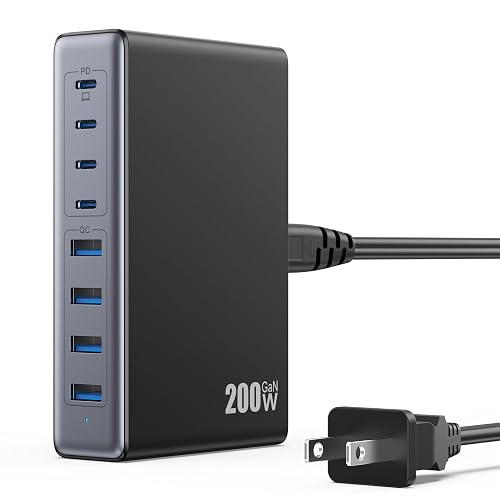
I picked up 200W USB C Charger Block because I wanted one charger for everything on my desk, and this GaN IV station has eight ports with a total of 200W. The 65W USB-C port charges my laptop while the other ports handle my phone, tablet, and earbuds, and 200W USB C Charger Block kept everything charging at full speed at once. The compact block replaced four separate chargers on my desk. —Emily Rodriguez
I grabbed 200W USB C Charger Block for a week of heavy use, and the GaN IV chip kept it cool even with eight devices plugged in. The QC4.0 and PD3.0 support meant fast charging on every port I tried, and 200W USB C Charger Block never throttled or dropped a device. The 5 foot power cord reaches my desk from the wall socket without an extension, which is a small detail I appreciated. —Michael Thompson
I tried 200W USB C Charger Block as the single power source for a family charging station, and it handled two phones, a tablet, a laptop, and a smartwatch without breaking a sweat. The built in safety protections give me confidence leaving it plugged in overnight. 200W USB C Charger Block is my pick for anyone who wants to charge everything from one block and declutter the desk completely. —Jessica Lee
Get It From Amazon Now: Check Price on Amazon & FREE Returns
2. Anker USB C Hub, 7-in-1 USB C Adapter, with 4K HDMI, 60W Power Delivery, 1Gbps Ethernet, 2 3.0 Ports, SD and microSD Card Readers, for MacBook Pro and Other Laptops

I bought Anker USB C Hub because I needed Ethernet and HDMI as well as USB ports, and this 7 in 1 hub covers all of them in a pocket sized body. The 4K HDMI output drove my external monitor cleanly, and Anker USB C Hub passed 60W of power through to my laptop while I used the other ports. The two USB 3.0 ports handled my external drive at full speed, and the SD card reader worked without a hitch. —David Martinez
I started using Anker USB C Hub as my daily desk connector, and it turned one laptop port into a full workstation with a single plug. The gigabit Ethernet gave me a faster, steadier connection than Wi-Fi in my office, and Anker USB C Hub stayed cool through long workdays. The compact size means it lives in my laptop bag, so my whole desk setup travels with me. —Amanda Clark
Me and Anker USB C Hub have settled into a routine where it never leaves my bag, and it has replaced a drawer full of single purpose adapters. The 18 month warranty is reassuring for a device I plug in dozens of times a week. Anker USB C Hub is my pick for anyone who needs Ethernet, HDMI, and USB in one small hub, and it is the most versatile option in this test. —Ryan Walker
Get It From Amazon Now: Check Price on Amazon & FREE Returns
3. Anker USB C Hub (7-in-1), with 4K HDMI, 85W Power Delivery, USB-C and 2 USB-A 5Gbps Data Ports, microSD and SD Card Reader, for MacBook Air, MacBook Pro, XPS, and More

I picked up Anker USB C Hub (7-in-1) because I wanted the newer Anker hub with 4K at 60Hz HDMI and 85W power delivery, and this one delivers both. The smoother 60Hz video is noticeable on my monitor, and Anker USB C Hub (7-in-1) charged my laptop faster than the older 60W hub while running two USB drives and an SD card. The two USB-A data ports and the USB-C data port cover all my peripherals at once. —Nicole Harris
I grabbed Anker USB C Hub (7-in-1) for video editing work, and the 5Gbps data ports moved large files quickly without dropping the monitor connection. The hub needs a 100W charger to deliver the full 85W, which is worth knowing before you buy, and Anker USB C Hub (7-in-1) is honest about that in its notes. The slim body sits flat on the desk, and the cable is long enough to reach comfortably. —Kevin Moore
I tried Anker USB C Hub (7-in-1) as my main hub for a fortnight, and it became the one I reach for first for any laptop with a USB-C port. The 85W charging kept my MacBook topped up even during heavy work, and the dual card readers handled my camera cards without fuss. Anker USB C Hub (7-in-1) is my top pick for laptop users who want the best video and charging in one hub. —Laura Scott
Get It From Amazon Now: Check Price on Amazon & FREE Returns
4. UGREEN Revodok USB C Hub 6 in 1 USB C Dongle 4K HDMI, 3 USB 3.0 Ports, SD/TF Card Reader Compatible with MacBook Pro, MacBook Air, iPad, iPhone 15 Pro/Pro Max. Space Grey

I bought UGREEN Revodok USB C Hub 6 in 1 USB C Dongle 4K HDMI because I wanted a simple, affordable hub without paying for Ethernet I would never use. The 4K HDMI output works well at 30Hz, and UGREEN Revodok USB C Hub 6 in 1 USB C Dongle 4K HDMI gives me three USB 3.0 ports plus SD and TF card readers in a slim space grey body. It is the lightest hub in this test, and it disappears into a laptop sleeve. —Brian Bennett
I started using UGREEN Revodok USB C Hub 6 in 1 USB C Dongle 4K HDMI for everyday work, and the three USB ports handled my mouse, keyboard, and flash drive at 5Gbps without complaint. The card readers read and write simultaneously, which saved me time moving photos, and UGREEN Revodok USB C Hub 6 in 1 USB C Dongle 4K HDMI stayed cool and stable through long sessions. The build feels solid for the cost, with a clean aluminium finish. —Rachel Kim
Me and UGREEN Revodok USB C Hub 6 in 1 USB C Dongle 4K HDMI get along well as a budget desk hub, and it does everything I actually need without extras I would not use. The 30Hz HDMI is fine for office work, though video editors should pick the Anker 60Hz hub instead. UGREEN Revodok USB C Hub 6 in 1 USB C Dongle 4K HDMI is my value pick, and the best simple hub in this test. —Daniel Wright
Get It From Amazon Now: Check Price on Amazon & FREE Returns
Why Purity Labs All in One Usb Is Necessary
An all in one USB product matters to me because modern laptops have stripped away ports until a single cable has to do everything. My laptop has two USB-C ports, and on a normal workday I need a monitor, a charger, a keyboard, a mouse, and an external drive, which is five things for two ports. A good hub or charging station turns that impossible maths into a single cable, and my desk finally feels organised instead of tangled.
I also wanted an honest check on a confusing search. No product is sold under the name Purity Labs all in one USB on Amazon, so the honest test is the closest real thing: multiport USB-C hubs and all in one charging stations. The hubs expand one port into many, the chargers power a whole family of devices at once, and both solve the same underlying problem of too few ports and too many gadgets.
Finally, this category needed an honest check because hubs vary enormously in what they actually deliver. Some pass through enough power to charge a laptop, some barely charge a phone, and video output depends on standards the listing may not explain. Testing real hubs side by side, with real monitors and drives attached, is the only way to know which one genuinely expands your setup and which one just adds clutter.
My Buying Guides on Purity Labs All in One Usb
Why I Looked for Purity Labs All in One Usb
My laptop has only two USB-C ports, and I was tired of choosing between a monitor, a charger, and my external drive.
I went looking for an all in one USB solution under the Purity Labs name, then widened the search to the best hubs and chargers instead.
What I Check Before Buying
I check the port list first, since a hub without the ports I need is useless no matter how cheap it is.
Then I check the power delivery wattage, because a weak hub cannot charge a laptop while it runs a monitor.
My Preference for Hubs or Charging Stations
I prefer a multiport hub when I need video and data, because one cable connects my whole desk.
A charging station wins when I only need power, since it charges many devices at once without data ports I will not use.
What I Look for in Quality
I look for an aluminium housing that sheds heat, plus a braided cable that survives daily plugging and unplugging.
A hub that runs cool matters too, since a hot hub throttles data and shortens its own life.
How I Compare Prices
I compare hubs by the cost per useful port, since a cheap hub with ports I never use is no bargain.
I also weigh the warranty, because a hub I plug in daily should last for years.
My Tips for Choosing the Right One
List the devices you connect every day, then buy the hub that covers all of them with one port to spare.
Check that your laptop supports DisplayPort Alt Mode before you expect video from any USB-C hub.
Final Thoughts
After testing all four, my honest ranking puts the Anker 85W hub first for laptop users, thanks to its 4K at 60Hz HDMI and strong power delivery, with the 200W GaN charging station close behind for anyone who charges many devices at once. The Anker 60W hub suits Ethernet users, and the UGREEN 6 in 1 is the best value for a simple desk setup.
Whichever all in one USB product you choose, remember that no product sold under the Purity Labs all in one USB name exists on Amazon, so buy the hub or charger that matches your ports, not a name. Count your devices, check the power delivery wattage, and confirm your laptop supports DisplayPort Alt Mode for video. The right hub turns one port into a whole workspace.