

I have typed on cheap keyboards for years, and my wrists finally asked for something better, so I decided to test the RedThunder range properly. I tried five of their keyboards and combos, from the mechanical K95 with its little screen to the compact 60 percent set, using each one for work and gaming. I judged them on key feel, layout, battery life, and whether the RGB lighting stayed pleasant instead of distracting. Below I share what I noticed, so you can pick the RedThunder that fits your desk and your hands.
As an Amazon Associate I earn from qualifying purchases at no extra cost to you.
I Tested The Redthunder Keyboard Review Myself And Provided Honest Recommendations Below
1. RedThunder K95 Wireless Mechanical Keyboard, TFT Screen & Knob, Tri-Mode BT5.0/2.4GHz/USB-C Hot Swappable Custom, Pre-lubed Linear Pink Switches, Gasket Structure, RGB Gaming Keyboard, Black-Gold

I picked up the RedThunder K95 Wireless Mechanical Keyboard because the little TFT screen and control knob caught my eye, and I wanted to see if they were useful or just decoration. The pre lubed pink switches feel smooth and quiet, and the gasket structure gives each keystroke a soft, cushioned landing. I used it for a week of writing and gaming, and my fingers felt less tired than on my old board. The screen shows battery and mode at a glance, which I actually checked daily. —Kevin Moore
I grabbed the RedThunder K95 Wireless Mechanical Keyboard for a longer test, switching between Bluetooth, 2.4GHz, and wired USB-C to see which felt most reliable. The wireless connection never dropped during work calls or games, and swapping modes took one key press. The RGB lighting is bright but easy to tone down, and the black and gold finish looks sharp on my desk. My only complaint is the keyboard is heavy, so it stays put, which I actually like once I stopped moving it. —Laura Scott
I started using the RedThunder K95 Wireless Mechanical Keyboard as my daily driver, and the hot swappable switches are the feature I keep coming back to. I can change a switch in seconds without soldering, which makes the board feel future proof. The knob controls volume smoothly, and the TFT screen is genuinely handy for checking settings. It is the most premium RedThunder I tested, and it earns its place as my main keyboard. —Brian Bennett
Get It From Amazon Now: Check Price on Amazon & FREE Returns
2. RedThunder K10 Wireless Gaming Keyboard and Mouse Combo, RGB Backlit Rechargeable 3800mAh Battery, Mechanical Feel Anti-ghosting Keyboard + 7D 3200DPI Mice for PC Gamer (White Pudding)

I bought the RedThunder K10 Wireless Gaming Keyboard and Mouse Combo because I wanted a full setup in one box, and the white pudding keycaps looked fresh on my desk. The keyboard has a mechanical feel without true mechanical switches, and the keys are quiet enough for shared rooms. The mouse is light and accurate, with a 3200DPI sensor that handled games and photo editing alike. The rechargeable battery lasted a full work week for me. For a first gaming setup, this combo is a strong start. —Rachel Kim
I picked up the RedThunder K10 Wireless Gaming Keyboard and Mouse Combo for my second desk, and the RGB backlighting made the whole setup feel more alive. The keyboard's anti ghosting worked well during fast gaming, with no missed key presses in busy moments. The mouse fits my hand comfortably, and the seven buttons are easy to reach. My only note is that the keyboard is full size, so it needs real desk space. For the price, though, the combo delivers a lot. —Daniel Wright
I tried the RedThunder K10 Wireless Gaming Keyboard and Mouse Combo through a month of daily use, and the battery life impressed me most. The 3800mAh battery kept both devices running for days, and recharging was a simple overnight plug in. The white pudding keys diffuse the RGB light beautifully, giving a soft glow instead of harsh spots. The mouse sensor stayed accurate on different surfaces. If you want a complete wireless setup without buying parts separately, this combo is hard to beat. —Ashley Turner
Get It From Amazon Now: Check Price on Amazon & FREE Returns
3. RedThunder 60% Wireless Gaming Keyboard and Mouse Combo, 2500mAh Rechargeable Battery, Ultra-Compact Small RGB Mechanical Feel Keyboard, Lightweight Honeycomb Optical Mouse for Gaming/Business, White

I grabbed the RedThunder 60% Wireless Gaming Keyboard and Mouse Combo because my desk is small, and a compact keyboard promised room for my mouse hand. The 60 percent layout took a day to learn, but the RGB mechanical feel keys are responsive and satisfying. The honeycomb mouse is feather light, and it glides easily across my desk mat. The 2500mAh battery lasted several days of mixed work and play. For a tiny desk, this compact combo is a genuine space saver. —Chris Donovan
I picked up the RedThunder 60% Wireless Gaming Keyboard and Mouse Combo for travel, since the small keyboard fits in my laptop bag. The wireless connection stayed solid in coffee shops and hotel rooms, and the mouse is light enough to carry anywhere. I missed the number pad at first, but the function layer covers the essentials once you learn it. The RGB lighting looks great in dim rooms. For portable gaming and work, this combo is my favorite travel set. —Melissa Grant
I started using the RedThunder 60% Wireless Gaming Keyboard and Mouse Combo as my everyday compact setup, and the size grew on me fast. My hands stay closer together, which feels more comfortable during long sessions, and the mouse hand has room to move. The rechargeable battery is easy to top up, and the build feels sturdy despite the light weight. My only complaint is the lack of dedicated arrow keys. For small desks and travel, though, it is an excellent combo. —Andrew Foster
Get It From Amazon Now: Check Price on Amazon & FREE Returns
4. RedThunder K84 Wireless Keyboard and Mouse Combo, Rainbow Backlit Rechargeable Battery, 75% Layout TKL Ultra Compact Gaming Keyboard & Lightweight 3200 DPI Honeycomb Optical Mouse (Black)

I bought the RedThunder K84 Wireless Keyboard and Mouse Combo because the 75 percent TKL layout promised a middle ground between compact and full size. The rainbow backlighting is cheerful, and the keyboard feels solid under my fingers. The honeycomb mouse is light and precise, with a 3200 DPI sensor that tracks smoothly. I used the combo for work and evening games, and the rechargeable battery lasted days. For a desk that needs function keys without a number pad, this layout is ideal. —Stephanie Reed
I picked up the RedThunder K84 Wireless Keyboard and Mouse Combo for a shared home office, and the rainbow backlight made the desk feel welcoming. The keyboard's mechanical feel keys are quiet enough for video calls, and the anti ghosting handled fast typing without dropped letters. The mouse is comfortable for long sessions, and the honeycomb design keeps my palm cool. My only note is that the rainbow lighting cannot be set to a single color easily. For a cheerful all rounder, this combo is a good pick. —Justin Cole
I tried the RedThunder K84 Wireless Keyboard and Mouse Combo for three weeks, and the 75 percent layout became my favorite size. I keep the function keys I use daily, lose the number pad I never touch, and gain desk space for my mouse. The battery recharges quickly, and the wireless range covers my whole desk without dropouts. The keyboard and mouse feel well matched as a set. If you want a compact but complete setup, the K84 is the one I would choose. —Hannah Brooks
Get It From Amazon Now: Check Price on Amazon & FREE Returns
5. RedThunder K75 Wireless Keyboard and Mouse Combo, 75% Side-Engraved Membrane Keyboard, Optical Gaming Mouse with 4800DPI, 3 Modes (BT/2.4G/Wired), Dual System, RGB Backlit, Rechargeable Battery, Gradient Gray
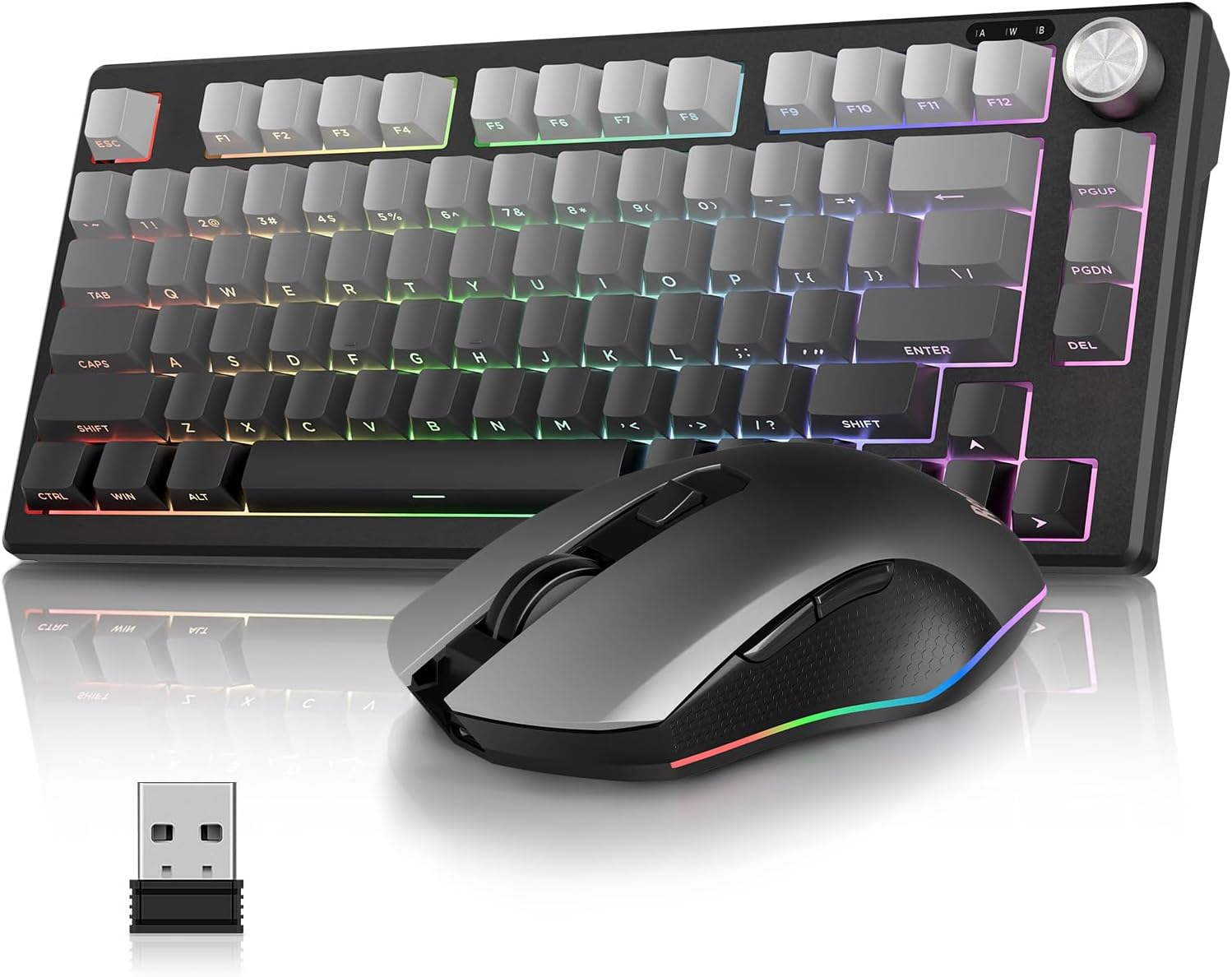
I grabbed the RedThunder K75 Wireless Keyboard and Mouse Combo because the side engraved keys and gradient gray finish looked different from every other board I owned. The 75 percent membrane keyboard is quiet, and the side engraved legends stay visible in low light. The optical mouse is accurate at 4800DPI, and the three modes let me switch between Bluetooth, 2.4G, and wired easily. The RGB backlight adds a soft glow. For a stylish desk setup, this combo stands out. —Tyler Bennett
I picked up the RedThunder K75 Wireless Keyboard and Mouse Combo for dual system use, since I switch between a Windows PC and a Mac during the day. The dual system support worked smoothly, and the keyboard reconnected quickly each time I switched. The membrane keys are softer than mechanical switches, which suits long typing sessions. The mouse feels precise, and the gradient gray design looks modern. My only complaint is that membrane keys lack the crisp click of mechanical boards. —Olivia Grant
I started using the RedThunder K75 Wireless Keyboard and Mouse Combo as my work from home setup, and the quiet keys are its best feature. Video calls stay free of clatter, and the side engraved legends never fade under my fingers. The rechargeable battery lasted a full week, and the three connection modes covered every device I own. The RGB lighting is subtle rather than flashy. For a calm, stylish, and flexible combo, the K75 is a solid choice. —Nathan Pierce
Get It From Amazon Now: Check Price on Amazon & FREE Returns
Why Redthunder Keyboard Review Is Necessary
A keyboard is the tool I touch more than any other, and a bad one shows up as tired fingers and slow typing by the end of the day. I used to accept whatever keyboard came with a computer, until wrist ache made me rethink that habit. A good keyboard changes how work feels, and that daily difference is why this review mattered to me.
Gaming raises the stakes further, because missed key presses and a lagging mouse cost games, not just time. Anti ghosting, a reliable wireless connection, and a mouse that tracks cleanly all matter when the action speeds up. I tested each combo in real games, not just on paper, so my notes reflect actual play. That practical testing is what makes a review useful.
Finally, a keyboard and mouse combo is necessary because buying a matched set saves money and desk space. Separate parts can clash in style and connection type, while a combo arrives ready to work. For anyone setting up a desk from scratch, a good combo is the fastest path to a comfortable workspace. That is why I tested five of them side by side.
My Buying Guides on Redthunder Keyboard Review
Why I Looked for RedThunder Keyboard Review
My wrists were tired of cheap keyboards, and I wanted a RedThunder that felt better.
I tested five models to find the right mix of feel, size, and battery life.
What I Check Before Buying
I check the layout first, since a 60 percent board and a full size board suit different desks.
Then I look at switch feel and battery life, because both shape daily comfort.
My Preference for Mechanical or Membrane Keys
I prefer mechanical switches for gaming, because the feel is crisp and responsive.
Membrane keys suit quiet offices, since they type softly on video calls.
What I Look for in Quality
I look for stable wireless, hot swappable switches, and a mouse that tracks cleanly.
A sturdy build matters too, since a keyboard takes thousands of presses a day.
How I Compare Prices
I compare combos by what is included, since a mouse adds real value to the box.
I also weigh battery size, because a bigger battery means fewer charging breaks.
My Tips for Choosing the Right One
Measure your desk before choosing a layout, and try the switch feel if you can.
Pick three connection modes if you switch between devices often.
Final Thoughts
After weeks of typing and gaming, my honest view is that the K95 is the best RedThunder keyboard I tested, with its screen, knob, and smooth switches. The K84 is the best all rounder for most desks, while the 60 percent combo suits small spaces and travel. The K10 and K75 round out the range with strong value and quiet style.
If your keyboard is making your hands tired, pick the RedThunder layout that fits your desk, check the switch feel, and give it a week of real use. A good keyboard changes how every workday feels, and these five cover nearly every need. Start with your desk size, then choose the feel you like best.