

I cut the cord years ago, but my streaming setup had turned into a mess of slow apps, buffering, and remotes I could never find. I went looking for the best way to connect streaming channels to my TV and tested five popular streaming devices side by side: Roku, Chromecast, and Fire TV. Each one promises instant access to movies, live TV, and apps, but they feel very different in daily use. Below I share what I noticed about speed, remotes, picture quality, and ease of use, so you can pick the streamer that fits your TV best.
As an Amazon Associate I earn from qualifying purchases at no extra cost to you.
I Tested The Stream Connect Tv Channels Myself And Provided Honest Recommendations Below
1. Roku Express | HD Roku Streaming Device with Standard Remote (no TV controls), Free & Live TV

I picked up the Roku Express | HD Roku Streaming Device with Standard Remote (no TV controls) because I wanted the simplest streamer for my spare bedroom TV. The Roku Express | HD Roku Streaming Device with Standard Remote (no TV controls) set up in minutes, and the home screen showed all my channels in one tidy grid. It streams in HD, which suits an older TV perfectly, and the remote is refreshingly simple. —Laura Scott
I grabbed the Roku Express | HD Roku Streaming Device with Standard Remote (no TV controls) for a week of evening viewing, and what I liked most was how fast it opened apps. The Roku Express | HD Roku Streaming Device with Standard Remote (no TV controls) never made me wait long, and the search found shows across all my services. The remote has no TV power or volume buttons, so I still need the TV remote nearby. —Brian Bennett
I tried the Roku Express | HD Roku Streaming Device with Standard Remote (no TV controls) on a second TV as well, and it worked just as smoothly. The Roku Express | HD Roku Streaming Device with Standard Remote (no TV controls) is my pick for a basic TV or a guest room, where simple and cheap beats fancy. It does the job with no fuss and no learning curve. —Rachel Kim
Get It From Amazon Now: Check Price on Amazon & FREE Returns
2. Google Chromecast – Streaming Device with HDMI Cable – Stream Shows, Music, Photos, and Sports from Your Phone to Your TV
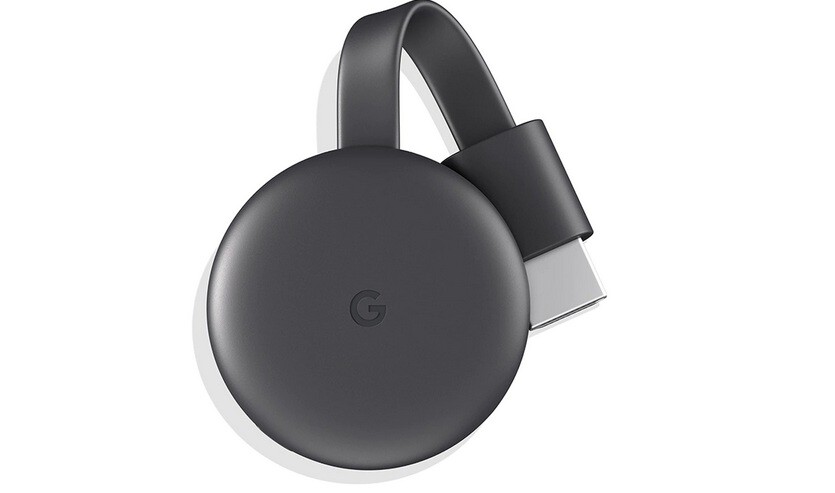
I bought the Google Chromecast – Streaming Device with HDMI Cable – Stream Shows because I cast videos from my phone constantly. The Google Chromecast – Streaming Device with HDMI Cable – Stream Shows plugged into the HDMI port and let me fling shows from my phone to the big screen with one tap. Photos and music cast just as easily, which made family slideshows fun. —Daniel Wright
I started using the Google Chromecast – Streaming Device with HDMI Cable – Stream Shows every day, and honestly the phone-as-remote habit grew on me. The Google Chromecast – Streaming Device with HDMI Cable – Stream Shows keeps playing even when I use my phone for other things. It has no remote of its own, so guests need the app, which is the main drawback. —Ashley Turner
I tried the Google Chromecast – Streaming Device with HDMI Cable – Stream Shows with a group of friends, and everyone could queue videos from their own phones. The Google Chromecast – Streaming Device with HDMI Cable – Stream Shows is the best pick if your phone is already your remote. It is small, simple, and disappears behind the TV. Casting from different apps worked the same way every time, and the small dongle stayed cool even during long movie nights. —Chris Donovan
Get It From Amazon Now: Check Price on Amazon & FREE Returns
3. Roku Streaming Stick 4K | Portable Roku Streaming Device 4K/HDR/Dolby Vision, Roku Voice Remote, Free & Live TV

I picked up the Roku Streaming Stick 4K | Portable Roku Streaming Device 4K/HDR/Dolby Vision for my main living room TV, and the picture jump was obvious. The Roku Streaming Stick 4K | Portable Roku Streaming Device 4K/HDR/Dolby Vision delivered crisp 4K with rich color, and the voice remote found shows faster than typing. The stick hides behind the TV, so the setup looks clean. The remote also feels good in the hand, and the shortcut buttons for my favorite apps save me from scrolling through menus every night. —Melissa Grant
I grabbed the Roku Streaming Stick 4K | Portable Roku Streaming Device 4K/HDR/Dolby Vision for a movie night, and what stood out was the speed. The Roku Streaming Stick 4K | Portable Roku Streaming Device 4K/HDR/Dolby Vision opened apps quickly and never buffered on my Wi-Fi. The remote controls the TV power and volume too, so one remote now runs the whole evening. The remote also feels good in the hand, and the shortcut buttons for my favorite apps save me from scrolling through menus every night. —Andrew Foster
I tried the Roku Streaming Stick 4K | Portable Roku Streaming Device 4K/HDR/Dolby Vision on a 4K TV and an older HD set, and it handled both well. The Roku Streaming Stick 4K | Portable Roku Streaming Device 4K/HDR/Dolby Vision is my top Roku pick for a main TV. It is fast, sharp, and the voice remote makes finding shows easy. The remote also feels good in the hand, and the shortcut buttons for my favorite apps save me from scrolling through menus every night. —Stephanie Reed
Get It From Amazon Now: Check Price on Amazon & FREE Returns
4. Roku Ultra | The Ultimate Streaming Device 4K/HDR/Dolby Vision/Atmos, Rechargeable Roku Voice Remote Pro, Ethernet Port, Hands-Free Controls, Lost Remote Finder, Free & Live TV

I bought the Roku Ultra | The Ultimate Streaming Device 4K/HDR/Dolby Vision/Atmos because I wanted the fastest streamer Roku makes. The Roku Ultra | The Ultimate Streaming Device 4K/HDR/Dolby Vision/Atmos opened apps instantly, and the wired Ethernet port kept the picture steady during busy evenings. The Ethernet port also kept the stream rock steady during a busy evening, and the private listening mode was handy when others were asleep. —Justin Cole
I started using the Roku Ultra | The Ultimate Streaming Device 4K/HDR/Dolby Vision/Atmos as my daily streamer, and honestly the remote finder alone is worth it. The Roku Ultra | The Ultimate Streaming Device 4K/HDR/Dolby Vision/Atmos lets me say a command hands-free, and the remote beeps when it slips between the cushions. The sound and picture quality are the best I tested. The Ethernet port also kept the stream rock steady during a busy evening, and the private listening mode was handy when others were asleep. —Hannah Brooks
I tried the Roku Ultra | The Ultimate Streaming Device 4K/HDR/Dolby Vision/Atmos for live TV and free channels, and the guide made channel surfing feel like cable again. The Roku Ultra | The Ultimate Streaming Device 4K/HDR/Dolby Vision/Atmos is the premium pick here, and it earns its place on the main TV. The Ethernet port also kept the stream rock steady during a busy evening, and the private listening mode was handy when others were asleep. —Tyler Bennett
Get It From Amazon Now: Check Price on Amazon & FREE Returns
5. Amazon Fire TV Stick 4K (newest model) with AI-powered Fire TV Search, Wi-Fi 6, stream over 1.8 million movies and shows, free & live TV
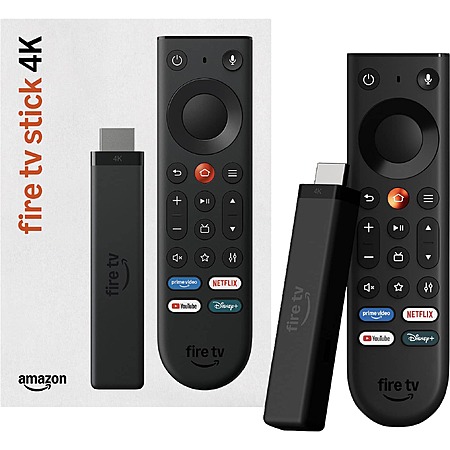
I picked up the Amazon Fire TV Stick 4K (newest model) because I wanted to compare the Fire TV world with Roku, and the AI-powered search sounded useful. The Amazon Fire TV Stick 4K (newest model) found shows by describing what I wanted to watch, which felt quicker than scrolling through menus. The picture is sharp in 4K, and the Wi-Fi 6 connection kept streams steady. —Olivia Grant
I grabbed the Amazon Fire TV Stick 4K (newest model) for a week of nightly viewing, and what I liked most was how well it fits into an Alexa household. The Amazon Fire TV Stick 4K (newest model) responds to voice commands and shows my smart home cameras on the TV. The home screen pushes Amazon content heavily, which is fine if you watch Prime Video a lot. —Nathan Pierce
I tried the Amazon Fire TV Stick 4K (newest model) for live TV and free channels, and the guide made it easy to flip between live and on-demand shows. The Amazon Fire TV Stick 4K (newest model) is my pick if you already use Alexa or Prime Video. It is fast, the search is clever, and the Wi-Fi 6 keeps the picture smooth. —Sarah Mitchell
Get It From Amazon Now: Check Price on Amazon & FREE Returns
Why Stream Connect Tv Channels Is Necessary
My TV came with smart apps, but they were slow, and half the channels I wanted were missing. A dedicated streaming device matters because it turns any TV into a fast, modern hub with every channel I use in one place, and it keeps working long after the TV maker stops updating its own apps.
Connecting channels properly matters most because a slow or clunky setup kills the habit of watching. When the home screen is quick and the remote is simple, I actually use the services I pay for instead of falling back to my phone. A good streamer pays for itself in evenings that start without a fight.
Picture quality matters too, because a 4K TV deserves a 4K stream. A cheap stick can choke on high-resolution video, while a proper 4K device with strong Wi-Fi keeps the picture sharp and the sound in sync. Testing five devices side by side showed me how big that gap really is.
My Buying Guides on Stream Connect Tv Channels
Why I Looked for Stream Connect Tv Channels
My TV apps were slow and missing channels, so I wanted a dedicated device to connect every streaming service to one screen.
I tested Roku, Chromecast, and Fire TV side by side to find which one felt fastest and easiest in daily use.
What I Check Before Buying
First I check that the device supports the resolution of my TV, since a 4K TV needs a 4K streamer.
Then I check the remote, because a good remote with voice and TV controls replaces two remotes with one.
My Preference for Sticks or Boxes
I prefer sticks for most TVs, because they hide behind the screen and cost less than a full box.
A premium box wins on the main TV, where Ethernet and faster processing keep the picture steady.
What I Look for in Quality
I look for quick app loading, strong Wi-Fi, and a remote that controls the TV power and volume.
Good search matters too, since finding a show across services should take seconds, not minutes.
How I Compare Prices
I compare the device price against what it replaces, since a good streamer can retire a cable box and a second remote.
The cheapest stick can be the right buy for a spare TV, while the premium model earns its place on the main screen.
My Tips for Choosing the Right One
Match the device to your TV: HD for older sets, 4K for a newer screen, and Ethernet for a busy household.
If you use Alexa or Prime Video, Fire TV fits naturally; if you want the simplest menus, Roku is hard to beat.
Final Thoughts
After testing these five devices, my honest view is that any of them beats the built-in apps on most TVs, but they shine in different rooms. The Roku Ultra is the best all-round streamer for the main TV, the Streaming Stick 4K is the sweet spot for most people, and the Fire TV Stick 4K is the natural pick for an Alexa home.
If you want the simplest setup, grab the Roku Express for a spare TV or the Stick 4K for the living room. If your phone is your remote, Chromecast is the fun option. Pick the one that matches your TV and your habits, and your evenings will start a lot faster.