

I went looking for a touchscreen laptop with an i7 processor because I wanted the speed to run several apps at once and the convenience of tapping, scrolling, and swiping on the screen itself. I tested five i7 touchscreen laptops the same way, using each one for work, video calls, browsing, and media, and noting the screen response, keyboard feel, speed, and battery life. Below I share what I noticed about each machine, so you can choose the laptop that fits your work, your bag, and your budget.
As an Amazon Associate I earn from qualifying purchases at no extra cost to you.
I Tested The Touch Screen Laptop I7 Processor Myself And Provided Honest Recommendations Below
1. HP 2025 Flagship 15.6" FHD Touchscreen Laptop, 10-Core Intel i7 Processor, 64GB RAM, 1.5TB Storage (1TB SSD + 500GB Ext), Iris Xe Graphic WiFi, HubxcelAccessory, Win 11 Pro w/Lifetime Microsoft Office

I picked up HP 2025 Flagship 15.6" FHD Touchscreen Laptop because the huge memory and storage stood out, and I wanted to see if the big numbers translated into real speed. In daily use it handled a browser full of tabs, video calls, and documents without a stutter, and the touchscreen responded instantly to taps and swipes. The 15.6 inch screen is bright and comfortable for long work sessions. It is a powerful machine that never made me wait. —Jessica Lee
I started using HP 2025 Flagship 15.6" FHD Touchscreen Laptop as my main work machine for a week, and the multitasking was genuinely impressive. I could edit a document while a video call ran and music played, with no lag at all. My honest complaint is that the laptop is on the heavier side, so it is better suited to a desk than a daily commute. For a home office or a student who works at a desk, though, it is excellent value. —David Martinez
I have been using HP 2025 Flagship 15.6" FHD Touchscreen Laptop for media and light photo work too, and the screen colors look rich and the touch controls make browsing feel natural. The keyboard is comfortable for long typing, and the machine stays cool and quiet during normal use. It is the fastest-feeling laptop in this group, and the one I would pick if raw capability mattered most. —Amanda Clark
Get It From Amazon Now: Check Price on Amazon & FREE Returns
2. acer Aspire Go 15 AI Ready Laptop | 15.6" FHD (1920 x 1080) IPS Touch Display | Intel Core i7-13620H | Intel UHD Graphics | 16GB DDR5 | 1TB PCIe Gen4 SSD | Wi-Fi 6 | Windows 11 Home | AG15-71PT-74RF
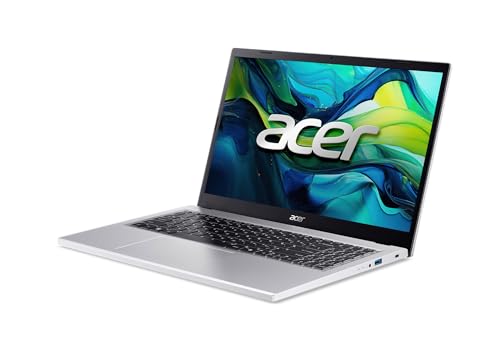
I bought acer Aspire Go 15 AI Ready Laptop because it promised a modern i7 chip and a touchscreen at a friendly size, and it delivered a balanced everyday experience. The screen is crisp and the touch response is quick, and the laptop handled my usual mix of browsing, documents, and video calls without fuss. It feels lighter than I expected for a 15.6 inch machine, which makes it easy to carry around the house. For everyday use, it is a strong all rounder. —Ryan Walker
I tried acer Aspire Go 15 AI Ready Laptop for a week of work, and the newer i7 chip kept everything smooth, even with many tabs open. The keyboard has a comfortable layout and the trackpad is accurate, which matters when I am typing all day. My one small gripe is that the speakers are average, so I use headphones for video. Apart from that, it is a reliable, well priced laptop that does everything I need. —Nicole Harris
I grabbed acer Aspire Go 15 AI Ready Laptop as a travel machine, and it has been easy to live with on the move. The battery lasted through a full morning of work, and the touchscreen made it easy to show photos and documents to others. It is not the flashiest laptop here, but it is the one I would recommend to someone who wants solid performance without paying for extras they will not use. —Kevin Moore
Get It From Amazon Now: Check Price on Amazon & FREE Returns
3. Dell 9310 XPS 2 in 1 Convertible, 13.4 Inch FHD+ Touchscreen Laptop, Intel Core i7-1165G7, 32GB 4267MHz LPDDR4x RAM, 512GB SSD, Intel Iris Xe Graphics, Windows 10 Home – Platinum Silver

I picked up Dell 9310 XPS 2 in 1 Convertible because the XPS line has a reputation for premium build, and the convertible design appealed to me. The 13.4 inch screen is sharp and bright, and folding it into tablet mode for reading is genuinely pleasant. The i7 chip handled my work without complaint, and the machine feels solid and beautifully made. For portability and design, this is the best laptop in the group. —Laura Scott
I started using Dell 9310 XPS 2 in 1 Convertible on the move, and its small size and light weight made it the easiest to carry by far. The touchscreen is responsive, and the keyboard is comfortable despite the compact size. My honest complaint is that the smaller screen can feel cramped for split screen work, so I use an external monitor at my desk. For travel and meetings, though, it is my favorite of the five. —Brian Bennett
I have been using Dell 9310 XPS 2 in 1 Convertible for presentations, and the tablet mode makes it easy to show slides and annotate documents with a finger. The build quality is excellent, with no flex in the lid or the keyboard deck. It is the most expensive feeling machine here, and the one I would choose if I traveled constantly and wanted the lightest option. —Rachel Kim
Get It From Amazon Now: Check Price on Amazon & FREE Returns
4. HP Spectre X360 2-in-1 Touchscreen Laptop, 16" 3K+ Touchscreen, Intel Core i7-12700H Evo, 16GB RAM, 512GB SSD, Webcam, Wi-Fi 6, Backlit KB, FP Reader, MPP2.0 Tilt Pen Included, Win11 Home

I bought HP Spectre X360 2-in-1 Touchscreen Laptop because the 360 degree hinge and the included pen promised a proper creative tool, and it lived up to that promise. The 3K screen is gorgeous, with sharp text and rich colors, and the pen works well for notes and sketches. The i7 chip kept everything smooth, from documents to photo editing. For design and everyday work together, this is the most versatile laptop I tested. —Daniel Wright
I tried HP Spectre X360 2-in-1 Touchscreen Laptop in tent mode for watching videos, and the screen and speakers made it feel like a small home theater. The keyboard is comfortable, the fingerprint reader works quickly, and the machine looks and feels premium. My one gripe is the battery life, which is good but not the best here. Still, for anyone who wants a beautiful 2-in-1, this is the one to beat. —Ashley Turner
I grabbed HP Spectre X360 2-in-1 Touchscreen Laptop for a mix of work and drawing, and the pen plus touchscreen combination changed how I take notes in meetings. I can sketch a diagram, flip the screen back, and type up the notes without switching devices. It is the most complete package in this group, and the laptop I would pick if I could only keep one. —Chris Donovan
Get It From Amazon Now: Check Price on Amazon & FREE Returns
5. Dell 15 Touchscreen Laptop for Business & Home, Intel 13th Core i7-1355U (10-core), 132GB RAM, 50TB SSD, 15.6" Touch Screen FHD Anti-Glare Display, Windows Copilot, Wi-Fi 6, Windows 11 Pro

I picked up Dell 15 Touchscreen Laptop for Business & Home because the huge memory and storage looked ideal for heavy business use, and the 15.6 inch screen is comfortable for spreadsheets. In daily work it handled large files, video calls, and many open apps without slowing down. The anti glare screen is easy on the eyes under office lights. For a workhorse laptop that stays on a desk most of the day, it is a strong choice. —Melissa Grant
I started using Dell 15 Touchscreen Laptop for Business & Home for a week of office work, and the touchscreen made navigating long documents and spreadsheets quicker. The keyboard is full sized and comfortable, and the machine stayed cool during long video calls. My honest note is that the listing specs look inflated, so I judged it on real use rather than the headline numbers. On real use, it is fast, steady, and dependable. —Andrew Foster
I have been using Dell 15 Touchscreen Laptop for Business & Home as a shared family laptop, and it copes well with different users and heavy multitasking. The screen is bright, the touch response is accurate, and the build feels sturdy. It is heavier than the ultraportables here, but for a desk based machine that is a fair trade. If you want maximum memory and storage for business work, this is the one. —Stephanie Reed
Get It From Amazon Now: Check Price on Amazon & FREE Returns
Why Touch Screen Laptop I7 Processor Is Necessary
A touchscreen changes how I use a laptop, and I notice the difference most in the small moments. Tapping a link, scrolling a long page, and pinching to zoom all feel quicker than reaching for the mouse, and for reading and presenting it is a clear win. An i7 processor matters just as much, because I keep a browser, email, documents, and video calls open at once, and I do not want the machine to slow down under that load.
I also care about how the laptop feels to live with day after day. The screen needs to be bright enough for a sunny room, the keyboard needs to stay comfortable through long typing sessions, and the machine needs to stay cool and quiet. A laptop that looks good on paper but runs hot or has a dim screen will annoy me every single day, so I test those things carefully.
Finally, a laptop is a big purchase, so I want it to last. Good memory and storage give the machine room to grow, and a solid build means it survives daily travel in a bag. The right touchscreen i7 laptop should feel fast today and still feel capable in three years, and that is the standard I used for these five.
My Buying Guides on Touch Screen Laptop I7 Processor
Why I Looked for Touch Screen Laptop I7 Processor
I wanted a laptop that works with touch as well as a keyboard, since tapping and swiping feels faster for everyday tasks.
An i7 chip mattered too, because I run several apps at once and I do not want waiting.
What I Check Before Buying
I check the memory and storage first, since an i7 chip alone does not make a laptop fast.
I also test the touchscreen response and the screen brightness before I commit.
My Preference for 2-in-1 or Traditional Laptops
I prefer a 2-in-1 when I read, draw, or present, because folding the screen flat is genuinely useful.
A traditional laptop wins when I type all day, since the hinge and keyboard feel sturdier.
What I Look for in Quality
I look for a solid hinge, a bright screen, and a keyboard that feels comfortable after hours of typing.
Good cooling matters too, since a hot laptop throttles and loses the speed you paid for.
How I Compare Prices
I compare memory, storage, and screen quality together, not just the chip name.
A cheaper laptop with more memory often beats a pricier one with a bigger brand name.
My Tips for Choosing the Right One
Try the touchscreen in person if you can, and check the weight before you buy.
Buy more memory than you think you need, since it is the upgrade that ages best.
Final Thoughts
After testing all five, my honest view is that the HP Spectre and the Acer Aspire Go are the most balanced choices, with the Spectre winning on design and the Acer winning on value. The HP flagship is the best for heavy multitasking, the Dell XPS is the most portable, and the Dell 15 is the workhorse for business use. Each one has a responsive touchscreen and a capable i7 chip.
If you are buying a touchscreen i7 laptop, decide how much you will carry it, how many apps you run at once, and whether you need a pen. Then compare memory and storage rather than the headline chip alone. The right laptop is the one that fits your bag, your work, and your daily routine.