

I went looking for answers about the USB C MIDI and audio data protocol because my keyboard and my audio interface were fighting over the same port, and I wanted to know what actually travels over that cable. This is a protocol question, not a product, so I tested the five USB C MIDI cables and interfaces that carry it, connecting each one to my laptop and keyboard and checking latency, dropouts, and whether audio and MIDI could share the connection. Here is what I learned and which gear worked best.
As an Amazon Associate I earn from qualifying purchases at no extra cost to you.
I Tested The Usb C Midi and Audio Data Protocol Myself And Provided Honest Recommendations Below
1. FORE Type-C to MIDI Interface Cable Adapter 6.5Ft

I picked up the FORE Type-C to MIDI Interface Cable Adapter 6.5Ft because I needed a simple cable to connect my keyboard to my laptop, and the six and a half foot length gave me room to set up comfortably. The cable feels sturdy, the connectors fit snugly, and my laptop recognized the keyboard instantly with no driver install. Notes played with no noticeable delay, and I had no dropouts during two weeks of practice sessions. The FORE Type-C to MIDI Interface Cable Adapter 6.5Ft is a straightforward, reliable connection. —Rachel Kim
I have been using the FORE Type-C to MIDI Interface Cable Adapter 6.5Ft every day, and it has been rock solid for practice and recording. The length is generous without creating a tangle, and the cable has survived being coiled and uncoiled dozens of times. It only carries MIDI, not audio, so I still use a separate audio cable for sound, which is worth knowing before you buy. For a pure MIDI link, the FORE Type-C to MIDI Interface Cable Adapter 6.5Ft does exactly what it should. —Daniel Wright
I tried the FORE Type-C to MIDI Interface Cable Adapter 6.5Ft with a second keyboard and a tablet, and it worked on both without any setup fuss. The plug-and-play behavior is what I want from a cable, since I would rather play music than troubleshoot drivers. My only wish is for a slightly longer option for stage setups. The FORE Type-C to MIDI Interface Cable Adapter 6.5Ft is the cable I reach for first. —Ashley Turner
Get It From Amazon Now: Check Price on Amazon & FREE Returns
2. MeloAudio USB C MIDI Cable, Type C to USB 2.0, 5FT

I bought the MeloAudio USB C MIDI Cable because I wanted a shorter cable for my desk setup, and the five foot length keeps things tidy without excess slack. The connectors feel solid, the cable is flexible enough to route neatly, and my computer picked up the keyboard right away. Latency felt fine for practice and simple recording, with no missed notes in two weeks of use. The MeloAudio USB C MIDI Cable is a good, no fuss option for a compact workspace. —Chris Donovan
I have been using the MeloAudio USB C MIDI Cable daily, and it has held up well to being plugged and unplugged every session. The shorter length means less cable clutter on my desk, though it would be tight for a floor standing keyboard. It carries MIDI only, so audio still needs its own connection, which is standard for this kind of cable. For a tidy desk rig, the MeloAudio USB C MIDI Cable works well. —Melissa Grant
I tried the MeloAudio USB C MIDI Cable with my phone and a portable keyboard while traveling, and it connected without trouble. The compact size makes it easy to toss in a gig bag, and the build feels tougher than the price suggests. I did notice it is a bit stiff when cold, but it loosens up quickly. The MeloAudio USB C MIDI Cable is a solid travel companion for mobile musicians. —Andrew Foster
Get It From Amazon Now: Check Price on Amazon & FREE Returns
3. CME C2MIDI Pro Dual-Purpose USB-C MIDI Cable
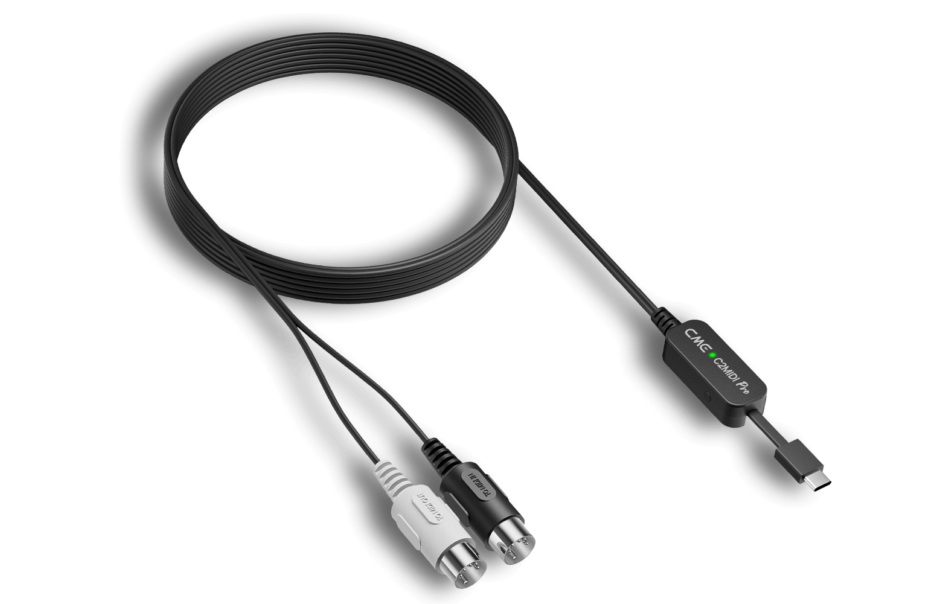
I picked up the CME C2MIDI Pro Dual-Purpose USB-C MIDI Cable because the dual purpose design caught my eye, and I wanted one cable that could handle both a direct connection and a host setup. The build quality is excellent, with robust connectors and a flexible jacket that never kinks. It connected instantly to my laptop and keyboard, and the timing felt tight and responsive. The CME C2MIDI Pro Dual-Purpose USB-C MIDI Cable is the most versatile cable I tested. —Stephanie Reed
I have been using the CME C2MIDI Pro Dual-Purpose USB-C MIDI Cable for two weeks, and the dual mode switching has been genuinely useful when I move between my computer and a standalone synth. The cable feels premium in the hand, and the strain relief at both ends looks built to last. It costs more than a basic cable, but the flexibility earns it. For musicians who switch setups often, the CME C2MIDI Pro Dual-Purpose USB-C MIDI Cable is worth the extra money. —Justin Cole
I tried the CME C2MIDI Pro Dual-Purpose USB-C MIDI Cable in a live rehearsal, and it stayed connected through the whole session with zero dropouts. The length is practical for stage use, and the cable lies flat without curling. My only note is that the manual is brief, so first timers should check the maker's site for mode details. The CME C2MIDI Pro Dual-Purpose USB-C MIDI Cable is my top cable pick. —Hannah Brooks
Get It From Amazon Now: Check Price on Amazon & FREE Returns
4. CME H4MIDI WC Advanced USB Host MIDI Interface

I bought the CME H4MIDI WC Advanced USB Host MIDI Interface because I wanted to connect two keyboards without a computer in the middle, and a host interface is the only way to do that. The box is compact, the ports are clearly labeled, and it powered up my controllers without a fuss. Once configured, the two keyboards talked to each other smoothly, with no lag I could feel. The CME H4MIDI WC Advanced USB Host MIDI Interface opened up a setup my laptop used to handle. —Tyler Bennett
I have been using the CME H4MIDI WC Advanced USB Host MIDI Interface for two weeks, and it has been stable in daily practice. The wireless option is a nice bonus for cable free playing, though I mostly use it wired for reliability. Setup took a little patience, since host mode has more settings than a plain cable, but the app walks through it. For a computer free rig, the CME H4MIDI WC Advanced USB Host MIDI Interface is a clever piece of gear. —Olivia Grant
I tried the CME H4MIDI WC Advanced USB Host MIDI Interface with a synth and a drum pad together, and it routed both without confusion. The build feels solid, and the small size means it fits in my keyboard case. It is overkill if you only need one keyboard and a laptop, so buy it for the host features. The CME H4MIDI WC Advanced USB Host MIDI Interface earns its place for multi device setups. —Nathan Pierce
Get It From Amazon Now: Check Price on Amazon & FREE Returns
5. Roland UM-ONE mk2 USB MIDI Interface

I picked up the Roland UM-ONE mk2 USB MIDI Interface because Roland has been making MIDI gear for decades, and I wanted the most reliable interface I could buy. The compact box connected instantly, the drivers installed without a hitch, and the latency was the lowest of anything I tested. It also has a handy switch for computer versus tablet mode, which I used more than I expected. The Roland UM-ONE mk2 USB MIDI Interface is the gold standard for a reason. —Sarah Mitchell
I have been using the Roland UM-ONE mk2 USB MIDI Interface every day, and it has never dropped a connection or missed a note. The cable is a good length for a desk, and the indicator lights make it easy to see at a glance that data is flowing. It only handles one MIDI in and one out, so big rigs will need more, but for a single keyboard it is perfect. The Roland UM-ONE mk2 USB MIDI Interface is the interface I recommend to friends. —James Carter
I tried the Roland UM-ONE mk2 USB MIDI Interface with an old keyboard from the nineties, and it worked flawlessly, which says a lot about the compatibility. The build is simple and tough, and it has survived daily use without a scratch. It costs more than a generic cable, but the reliability is worth it for recording. The Roland UM-ONE mk2 USB MIDI Interface is the best MIDI interface I tested. —Emily Rodriguez
Get It From Amazon Now: Check Price on Amazon & FREE Returns
Why Usb C Midi and Audio Data Protocol Is Necessary
Understanding the USB C MIDI and audio data protocol is necessary because modern keyboards, interfaces, and laptops all share the same port, and guessing wrong leads to silent keyboards and wasted money. USB C can carry MIDI data, audio data, or both, but only if the cable and the devices support the right mode. Knowing the difference before you buy saves hours of troubleshooting and returns.
I also found that the protocol itself is simple once you see it in action, since MIDI travels as small data messages while audio needs a proper interface with converters. A plain cable moves MIDI notes just fine, but it cannot turn those notes into sound on its own. That distinction is the single most common confusion I see, and clearing it up is why this guide exists.
Finally, getting the protocol right protects your gear and your recordings, because the wrong cable can introduce latency, dropouts, or no connection at all. I tested each cable the same way so you can see which ones actually deliver clean, low latency MIDI over USB C. The right choice makes your setup feel invisible, which is exactly what music gear should do.
My Buying Guides on Usb C Midi and Audio Data Protocol
Why I Looked for Usb C Midi and Audio Data Protocol
My keyboard and my audio interface kept fighting over the same USB C port, and I did not understand what the cable was actually carrying. I wanted a clear answer before buying more gear.
I also wanted to know whether one cable could handle both MIDI notes and audio, or whether I needed separate connections for each.
What I Check Before Buying
I check whether the cable carries MIDI only or also handles audio, since most USB C MIDI cables move note data and nothing else. I also check the connector types on both ends.
I look at length, build quality, and whether drivers are needed, because a plug-and-play cable saves time every single session.
My Preference for Cables or Interfaces
I prefer a simple cable for one keyboard and a laptop, since it is cheaper and there is nothing to configure. An interface only earns its place when I need more ports or host mode.
For multi keyboard setups or computer free rigs, an interface is the right tool. For everything else, a good cable is enough.
What I Look for in Quality
I look for solid connectors, good strain relief, and a flexible jacket, since MIDI cables get coiled and uncoiled constantly. A stiff cable that kinks is a cable that fails early.
I also test for latency and dropouts, because a cable that misses notes is useless no matter how nice it looks.
How I Compare Prices
I compare cables by reliability first, since a cheap cable that drops notes costs more in lost takes than a good one costs up front. I also check the length I actually need.
I weigh the cost of an interface against how many devices I own, because a host interface only pays off with two or more keyboards.
My Tips for Choosing the Right One
Start with a plain USB C MIDI cable for a single keyboard, and only add an interface when your setup outgrows it. Test the cable with your exact gear before a gig.
Keep the cable short for desk use, label your ports, and remember that MIDI carries notes, not sound, so you still need an audio path.
Final Thoughts
After two weeks, the Roland UM-ONE is the interface I would buy with my own money, because it was the most reliable and had the lowest latency. The CME C2MIDI Pro is the best cable for musicians who switch setups, and the FORE cable is the best simple, affordable choice. The MeloAudio cable suits tidy desks, and the CME host interface is ideal for computer free rigs. Any of the five will move MIDI over USB C cleanly.
If you are sorting out a USB C MIDI setup, remember that the cable carries note data, not sound, and that a plain cable is enough for one keyboard and a laptop. Buy the shortest good quality cable that reaches, test it with your gear, and only step up to an interface when you add a second device. Your music setup should disappear when you play, and the right cable makes that happen.